
Key takeaways
- Compare compact headphone DAC amplifiers for nearfield workspaces, with small footprints, front headphone jacks and preamp outputs for powered monitors.
What's inside
As an Amazon Associate I earn from qualifying purchases. This post may contain affiliate links at no extra cost to you.
A nearfield desk already gives its surface to a monitor, a keyboard, and a pair of powered speakers, so a headphone DAC amplifier has to earn a small footprint and stay reachable. The real decision is which single box can feed your headphones from the front panel, control volume for your monitors through a preamp output, and still leave room to work.
This guide serves listeners who mix and check work on nearfield monitors, desk workers who switch between speakers and headphones all day, and anyone replacing a crowded two-box stack with one compact unit. It also suits smaller desks where the audio box must share space with a laptop stand, an audio interface, or a second screen without pushing the monitors apart. Every product below was chosen from the names and specifications printed on its Amazon product page.
Quick Picks
As an Amazon Associate we earn from qualifying purchases.
| Product | Best for | Key spec from title |
|---|---|---|
| FiiO K11 DAC and Headphone Amplifier (Black) | Compact desks needing balanced headphone power | 1400mW, 384kHz/24Bit DSD256 |
| FIIO K11 R2R DAC and Headphone Amplifier (Black) | Listeners who prefer an R2R resistor-array DAC | 1300mW, 384kHz/24Bit DSD256 |
| Topping DX3 Pro+ DAC and Headphone Amplifier (Black) | Monitor control with a remote and Bluetooth input | ES9038Q2M, Bluetooth 5.0, remote control |
| iFi ZEN Air DAC | The smallest, simplest one-cable desk setups | MQA renderer, high resolution DAC |
How to Choose
Footprint and Front-Panel Reach
Measure the free strip of desk between your keyboard and your monitors before you shop, because that strip decides the largest chassis you can live with. Compact units around fifteen centimetres wide can sit under a monitor stand or beside a speaker without pushing anything else aside. The headphone jack and the volume knob belong on the front panel, within arm reach, so you can plug in and adjust level without leaning behind the desk or moving the unit every time you switch between speakers and headphones during a session.
A Preamp Output for Powered Monitors
Nearfield workspaces usually pair the DAC amplifier with powered monitors, so look for a rear line output that can work as a variable preamp output rather than a fixed line level only. A variable output lets the front knob set monitor volume from your chair, which matters when the speakers sit at ear height and their own rear volume controls are awkward to reach. Confirm on the product page whether the headphone output and the line output can be switched, muted, or used in the mode your daily routine actually needs.
Headphone Power and Output Choices
Check the rated output power against the headphones you already own instead of chasing the largest number on the page. Easy desktop headphones need modest power, while higher-impedance or less sensitive models benefit from the stronger balanced output many compact units provide through a 4.4mm jack alongside the standard 6.35mm socket. Gain settings also matter at a nearfield desk, because sensitive earphones used for calls or quiet checking need fine, low-level volume control without hiss or sudden jumps when you turn the knob.
Inputs and Power Supply Practicality
Count the digital sources on your desk before choosing. A computer alone is served by USB, but a desk that also holds a streamer, a console, or a disc player benefits from optical and coaxial inputs on the same box. Power supply style changes cable clutter too. USB-powered units need only one cable and suit minimal setups, while models with an external adapter need a free outlet and a place to hide the brick, so check what the listing includes and where that adapter will physically sit.
The 4 Best Options
FiiO K11 DAC and Headphone Amplifier (Black)

The K11 suits a nearfield desk that needs one compact box to handle both headphones and powered monitors. Its chassis is small enough to slide under a monitor riser, the front panel carries both headphone jacks and the control knob, and the rear RCA output feeds powered speakers. With strong balanced output on the page, it also covers harder-to-drive headphones that a listener might rotate through the same workspace, making it the most flexible starting point here.
Specs
- DAC chip: CS43198
- Headphone outputs: 6.35mm single-ended and 4.4mm balanced
- Output power: 1400mW balanced, per the listing title
- Supported formats: 384kHz/24Bit PCM and DSD256
- Digital inputs: USB, optical, and coaxial
- Line output: RCA, plus coaxial output
- Power supply: external DC adapter
Best for: A compact desk that needs balanced headphone power and an RCA feed for powered monitors.
Watch out for: It runs from an external power adapter rather than USB bus power, so plan an outlet and cable route.
ASIN: B0CJFG3DC7
FIIO K11 R2R DAC and Headphone Amplifier (Black)

The K11 R2R keeps the same compact desktop format as the standard K11 but swaps the conversion stage for a fully differential 24-bit R2R resistor array, which will interest listeners who specifically shop for ladder-DAC designs. It keeps the dual headphone jacks, the RCA line output for powered monitors, and the same three digital inputs, so it fits the same nearfield footprint. Its NOS and OS modes give one box two decoding behaviours for listeners who like to compare presentation styles.
Specs
- DAC: fully differential true 24-bit R2R resistor arrays
- Playback modes: NOS and OS dual modes
- Headphone outputs: 6.35mm single-ended and 4.4mm balanced
- Output power: 1300mW balanced, per the listing title
- Supported formats: 384kHz/24Bit PCM and DSD256
- Digital inputs: USB, optical, and coaxial
- Line output: RCA, plus coaxial output
Best for: Listeners who want an R2R resistor-array DAC in the same small chassis as the standard K11.
Watch out for: Confirm the colour and variant on the listing, because the standard K11 and the K11 R2R are separate products with separate pages.
ASIN: B0D9BB5RL1
Topping DX3 Pro+ DAC and Headphone Amplifier (Black)

The DX3 Pro+ fits a nearfield workspace where the DAC amplifier doubles as the control centre for powered monitors. The listing describes it as a DAC, headphone amplifier, and preamplifier with a remote control, so monitor volume can be adjusted from the listening position instead of at the unit. Bluetooth 5.0 with LDAC adds a phone or tablet input without another cable across the desk, and the ES9038Q2M and NFCA design covers a wide range of desktop headphones from the front jack.
Specs
- DAC chip: ES9038Q2M with XU208 USB stage
- Amplifier design: NFCA headphone amplifier
- Wireless input: Bluetooth 5.0 with LDAC audio decoding
- Digital inputs: USB, optical, and coaxial
- Function: DAC, headphone amplifier, and preamplifier with remote control
- Headphone output: front-panel jack
- Colour: Black
Best for: Desks where monitor volume is adjusted from the chair and a wireless phone input is useful.
Watch out for: The Bluetooth antenna and remote add small items to the desk, so check you have a tidy place for both.
ASIN: B09JC3TCJF
iFi ZEN Air DAC
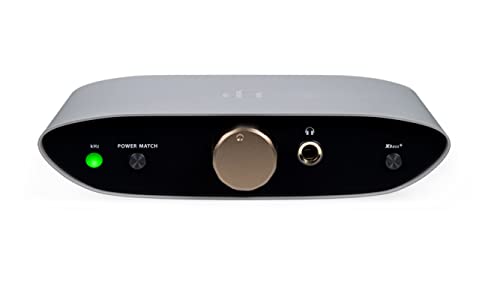
The ZEN Air DAC is the simplest option here for a small nearfield desk that only needs a computer as its source. It is a high resolution DAC and headphone amplifier in one compact unit, with the volume knob and headphone output on the front and an RCA output on the back for powered monitors or an amplifier. For a listener who wants one short cable run, a reachable knob, and no extra features competing for space, it keeps the workspace audio chain deliberately minimal.
Specs
- Type: high resolution DAC and headphone amplifier
- Decoding: MQA renderer
- Headphone output: 6.3mm front-panel jack
- Line output: RCA stereo output
- Digital input: USB
- Front controls: volume knob with Power Match and XBass+ controls
- Power: DC 5V input, per the product design
Best for: Minimal desks with a single computer source and powered monitors on the RCA output.
Watch out for: It offers USB input only, so a desk that later adds optical or coaxial sources will outgrow it.
ASIN: B09T6Y27R1
Which One Fits Your Situation
You Mix on Monitors and Check on Headphones
Pick the FiiO K11. Its RCA output feeds your powered monitors while both headphone jacks stay on the front panel, so moving between speakers and headphones during a mix check is a knob turn and a plug swap. The balanced output also leaves headroom for less sensitive headphones you might use for detailed checking at the same desk.
You Want Monitor Volume Control From Your Chair
Pick the Topping DX3 Pro+. Its preamplifier function and included remote control mean the powered monitors on its output can be trimmed from the listening position, which suits larger nearfield desks where the unit sits beyond comfortable reach. Bluetooth input also lets a phone join the desk without another cable run across the work surface.
Your Desk Has Room for Exactly One Small Box
Pick the iFi ZEN Air DAC. It covers the essentials for a computer-based nearfield setup, headphones at the front and powered monitors from the rear RCA output, without a remote, an antenna, or extra inputs taking space. It is the easiest of these four to place on a crowded desk and the easiest to remove when the workspace changes.
You Specifically Want a Resistor-Ladder DAC
Pick the FIIO K11 R2R. It is the only design here built around a fully differential 24-bit R2R resistor array rather than a delta-sigma chip, and it keeps the same compact chassis, dual headphone jacks, and RCA monitor feed as the standard K11. Choose it when the conversion architecture itself is the reason for the purchase, not as a default upgrade.
Common Mistakes
- Buying a DAC-only or amplifier-only box and discovering the nearfield desk now needs two units, two power supplies, and an extra interconnect cable.
- Ignoring whether the line output is fixed or variable, then finding the front knob does not control the powered monitors at all.
- Placing the unit behind a monitor where the headphone jack and volume knob cannot be reached without moving it every session.
- Assuming every compact unit runs on USB power, when several need an external adapter and a free outlet near the desk.
- Choosing by headline output power alone while ignoring gain range, which is what decides usable volume control with sensitive earphones.
Frequently Asked Questions
Can one DAC amplifier run both headphones and powered nearfield monitors?
Yes, provided the unit has a line or preamp output alongside its headphone jack, as all four products here do. The headphone output serves your headphones while the rear RCA output feeds the powered monitors. Check the listing for how the outputs switch or mute, because that behaviour decides how smooth the daily changeover between speakers and headphones will feel.
Is a variable preamp output better than a fixed line output for monitors?
For most nearfield desks, yes. A variable preamp output lets the front-panel knob set monitor volume from your chair, which is convenient when the speakers are raised on stands and their rear controls are hard to reach. A fixed line output still works, but then monitor volume must be set on the speakers themselves or in software on the computer.
Do I need a balanced 4.4mm headphone output at a desk?
Only if your headphones have a balanced cable or need the extra power the balanced output provides. The standard 6.35mm jack on these units drives most desktop headphones comfortably. Balanced output becomes worthwhile with less sensitive or higher-impedance models, where the higher rated power on the product page translates into comfortable listening levels with headroom to spare.
Will a USB-powered unit suit a nearfield workspace?
It can, when the computer is the only source and the headphones are easy to drive. USB power removes an adapter and simplifies cable routing, which helps on small desks. If you also need optical or coaxial inputs, stronger headphone output, or a remote-controlled preamp output for monitors, a model with its own power supply usually covers those requirements better.
Related guides
More from Amazon
Programs that pair well with the guide above. Offers and eligibility are set by Amazon and may change.
Free shipping on eligible items, Prime Video and more. Eligible new members can start with a free trial.
Start a Prime free trialAudiobooks and podcasts to listen to on the go. Eligible new members can start with a free trial.
Try Audible freeAd-free music streaming. Eligible new subscribers can start with a free trial.
Try Music Unlimited freeA free business account with business pricing and bulk-buying tools for work, shop or home office.
Create a business accountAs an Amazon Associate we earn from qualifying purchases.










Write Your Review
No reviews yet. Be the first to share your experience!