
Key takeaways
- Compare the best embroidery machine brands for home and small business, with one standout model each from Brother, Janome and POOLIN, plus hoop guidance.
What's inside
As an Amazon Associate I earn from qualifying purchases. This post may contain affiliate links at no extra cost to you.
Choosing an embroidery machine is really choosing a brand ecosystem, not just a single box. The brand decides the hoop sizes you can buy later, the file formats the machine reads, how designs reach the machine, and where you turn when a project stalls. A machine with a generous hoop but awkward design transfer can slow every project, while a smaller machine from a brand with clear training and easy file handling can stitch happily for years.
This guide is for home embroiderers personalising gifts and garments, hobbyists moving up from a small hoop, and small sellers stitching logos and apparel in modest volumes. Each pick below comes from a different brand, and every model is named with the specifications shown on its Amazon listing, so you can compare Brother, Janome and POOLIN on the same terms.
Quick Picks
As an Amazon Associate we earn from qualifying purchases
| Product | Best for | Key spec from title |
|---|---|---|
| Brother PE900 Embroidery Machine with WLAN | First dedicated embroidery machine for home use | 5 x 7 inch embroidery field with wireless LAN |
| Janome Memory Craft 550E Limited Edition Embroidery Machine | Large designs without splitting them across hoops | 14 x 7.9 inch embroidery field |
| POOLIN EOC07 Embroidery Machine | Long designs and small-business starter projects | 7.9 x 15 inch embroidery area with 7 inch touchscreen |
How to Choose
Hoop size decides what you can stitch in one setup
The embroidery field is the hard limit on a single design, so it deserves attention before design counts or screen size. A 4 x 4 inch field suits monograms, pocket logos and small patches, while a 5 x 7 inch field opens up chest logos, towel ends and quilt blocks. Fields of 7.9 x 11 inches and beyond handle jacket backs, large home textiles and long borders without re-hooping, which also removes the alignment errors that creep in when a design is split. Measure the largest item you plan to embroider, add room for the hoop frame and the moving carriage, and check that your table leaves clearance behind the machine, because the hoop travels further than the field itself.
Design transfer shapes your daily workflow
Designs reach a machine by USB stick, wireless network, or a phone app, and the method you tolerate decides how often you actually use the machine. Wireless transfer lets you send a file from a computer or phone without carrying a stick between rooms, and an app that draws or downloads designs adds a path for quick custom work. USB-only transfer is reliable and simple, but it means keeping track of a stick and walking files over by hand. Before buying, confirm the file formats the listing names, confirm your design source can export them, and check whether the machine edits designs on screen, since rotating, resizing and combining on the machine saves round trips to a computer.
Embroidery-only or a sewing and embroidery combination
An embroidery-only machine does one job and usually does it with a larger field and a simpler threading path, which suits anyone who already owns a sewing machine. A combination machine sews seams and embroiders in one unit, saving space and money for a beginner who needs both, but the embroidery field is often smaller and switching between modes takes time. Multi-needle machines add automatic colour changes for logos and repeat orders, yet they are heavier, louder and need more floor space. Match the machine type to the work you will repeat weekly, not to the project you imagine doing once.
Support, training and parts after the sale
A brand matters most after delivery, when threading, tension and stabiliser questions appear. Look for a listing that names included training, a manual in your language, and a support channel you can actually reach. Check which hoops, needles and bobbins the brand sells for that exact model, because a machine whose accessories are scarce becomes hard to live with. Dealer-supported brands often sell through local shops with classes and servicing, while direct-to-buyer brands tend to offer online training and user groups. Read the included-components list carefully, since starter kits, extra hoops and software vary between bundles of the same model.
The 3 Best Options
Brother PE900 Embroidery Machine with WLAN — Brother
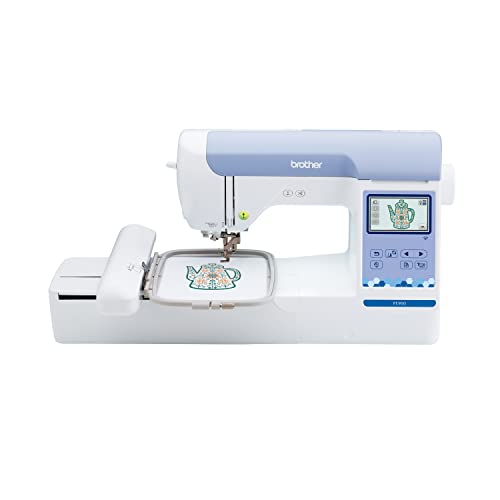
Brother is the most widely stocked embroidery brand on Amazon, and the PE900 is its current dedicated embroidery-only model, replacing the older PE800. It suits a home embroiderer who already owns a sewing machine and wants a straightforward way to personalise garments, towels and gifts. Wireless transfer and the Artspira app remove the USB shuffle, while colour sorting and jump stitch trimming cut the fiddly thread changes that slow multicolour designs. The 5 x 7 inch field covers the chest logos and monograms most home projects need.
Specs
- Embroidery-only machine, no sewing function
- 5 x 7 inch embroidery field
- 193 built-in embroidery designs
- 13 lettering fonts
- 3.7 inch touchscreen display
- Embroidery speed up to 650 stitches per minute
- Wireless LAN, USB port and Artspira app support
- Advanced Color Sort and Jump Stitch Trimming
Best for: Home embroiderers who want a current Brother embroidery-only machine with wireless design transfer.
Watch out for: It cannot sew seams, so you still need a separate sewing machine for garment construction. Confirm whether the listing is the standalone machine or a bundle, since included hoops and thread kits differ.
Janome Memory Craft 550E Limited Edition Embroidery Machine — Janome

Janome has built its reputation on quiet, sturdy single-needle machines, and the Memory Craft 550E is its largest stand-alone embroidery machine. The long 7.9 x 14.2 inch field is the reason to choose it: jacket backs, table runners and large quilt blocks stitch in one hooping instead of two or three. Four included hoops cover small motifs through to the full field, and the on-screen editing tools handle rotating, combining and repositioning designs. It is an embroidery-only machine aimed at committed hobbyists and home studios that already have a sewing machine.
Specs
- Embroidery-only machine, no sewing function
- 7.9 x 14.2 inch maximum embroidery field
- 180 built-in embroidery designs
- 4 embroidery hoops included
- Embroidery speed up to 860 stitches per minute
- AcuStitch software included
- USB design transfer
- Colour touchscreen with on-screen editing
Best for: Experienced home embroiderers who regularly stitch large or long designs and want to avoid splitting them.
Watch out for: The large hoop needs generous table space behind the machine for the carriage to travel. Check the exact bundle, since Limited Edition packages vary in included software and accessories.
POOLIN EOC07 Embroidery Machine — POOLIN

POOLIN is a newer direct-to-buyer brand that competes on field size and starter support rather than dealer networks. The EOC07 offers the largest single-needle field in this guide at 7.9 x 15 inches, which suits long names across hoodie backs, towel borders and jacket panels. Its 7 inch touchscreen runs the Institch OS3 system, designs arrive by Wi-Fi or USB, and the listing pitches one-on-one training and a starter supplies kit at beginners. For a home studio or a small seller taking first custom orders, that combination of size and hand-holding is the appeal.
Specs
- Single-needle embroidery-only machine
- 7.9 x 15 inch maximum embroidery area
- 7 inch colour touchscreen with Institch OS3
- 200 built-in embroidery designs
- Wi-Fi and USB design transfer
- Embroidery speed up to 860 stitches per minute
- 4 embroidery hoops included
- Starter supplies included
Best for: Beginners and small sellers who want the longest single-needle field and guided setup help.
Watch out for: The listing has shown a part-number typo naming the smaller EOC06, so confirm the title, model number and 15 inch field on the listing before ordering. It is embroidery only, so a separate sewing machine is still needed.
Which One Fits Your Situation
You are starting embroidery and want the easiest first machine
Pick the Brother PE900. Its wireless transfer and phone app make loading a first design simple, the 193 built-in designs cover months of practice projects, and Brother accessories and tutorials are the easiest to find. The 5 x 7 inch field is large enough for the personalised gifts most beginners start with, and the embroidery-only layout keeps threading simple.
You keep running into the edge of a small hoop
Pick the Janome Memory Craft 550E. Its 7.9 x 14.2 inch field removes the need to split designs that a 5 x 7 inch hoop cannot hold, and four included hoops mean you are not buying the large hoop separately. The sturdy build and on-screen editing suit someone who already knows they embroider often and wants the re-hooping to stop.
You stitch long names, borders and jacket backs
Pick the POOLIN EOC07. Its 7.9 x 15 inch field is the longest here, so names across a hoodie back or a border along a towel stitch in one pass. Wi-Fi transfer and the large touchscreen keep setup approachable, and the starter kit means thread, bobbins and stabiliser are in the box for a first project.
You already own a sewing machine and only need embroidery
Pick the Brother PE900 or the POOLIN EOC07. Both are embroidery-only machines, so you pay for stitching capability rather than a second sewing function you already own. Choose the Brother for wireless convenience and the widest accessory support, or the POOLIN when the longest field matters more than brand familiarity.
Common Mistakes
- Buying on design count alone, when hoop size and transfer method affect every project far more.
- Choosing a combination machine for embroidery volume, then finding the field too small for the designs you actually stitch.
- Forgetting the carriage needs clear space behind the machine, so a large hoop cannot travel its full range.
- Ordering without checking the file formats, then discovering your design source cannot export a format the machine reads.
- Assuming every bundle of the same model includes the same hoops, thread and software, when bundle contents vary between listings.
Frequently Asked Questions
Which embroidery machine brand is best for beginners?
Brother is the simplest starting point for most beginners, because its machines are widely stocked, its app and wireless transfer are easy to learn, and tutorials and accessories are easy to find. POOLIN is a strong alternative when a beginner wants a larger field and guided training, while Janome suits a beginner who already knows they will stitch large designs often and wants a sturdier machine from the start.
Do I need a machine that also sews?
Only if you do not already own a sewing machine. A combination machine saves space and covers both jobs, but its embroidery field is usually smaller. If you already sew on another machine, an embroidery-only model such as the Brother PE900 or POOLIN EOC07 gives you a larger field and a simpler threading path for the same kind of money.
What hoop size do I actually need?
Match the hoop to the largest design you will stitch regularly. A 4 x 4 inch field covers monograms and pocket logos, 5 x 7 inches covers chest logos and towel ends, and fields above 7.9 x 11 inches cover jacket backs and home textiles. Buying larger than your usual work wastes table space, while buying smaller forces you to split designs and align the joins.
Can I use my own embroidery designs on these machines?
Yes, all three machines in this guide accept designs from outside sources, by USB and, on the Brother and POOLIN models, by wireless transfer as well. Check the file formats named on the listing before buying, confirm your design source exports one of them, and keep a USB stick as a backup even on wireless models.
Related guides
More from Amazon
Programs that pair well with the guide above. Offers and eligibility are set by Amazon and may change.
Free shipping on eligible items, Prime Video and more. Eligible new members can start with a free trial.
Start a Prime free trialAudiobooks and podcasts to listen to on the go. Eligible new members can start with a free trial.
Try Audible freeAd-free music streaming. Eligible new subscribers can start with a free trial.
Try Music Unlimited freeA free business account with business pricing and bulk-buying tools for work, shop or home office.
Create a business accountAs an Amazon Associate we earn from qualifying purchases.










Write Your Review
No reviews yet. Be the first to share your experience!