
Key takeaways
- Find the best Brother embroidery machine for a small business, from 5 by 7 models to a larger 6 by 10 field, with hoop size and design libraries compared.
What's inside
As an Amazon Associate I earn from qualifying purchases. This post may contain affiliate links at no extra cost to you.
A small embroidery business lives or dies on turnaround time, not on how many designs a machine can store. The real decision is how often you will rehoop a garment, how many thread colours a typical order needs, and whether one machine can handle both the stitching and the sewing that a finished product requires. A machine that forces a rehoop for every left-chest logo slows a batch of twenty shirts far more than a slightly larger design library ever speeds it up.
This guide is for owners of small embroidery shops, market stall sellers, and home-based makers who take paid orders for monogrammed towels, team shirts, caps, tote bags, and personalised gifts. Every machine below is a Brother model, chosen from the name and specifications shown on its Amazon listing, so the comparison stays inside one brand, one support network, and one way of transferring designs.
Quick Picks
As an Amazon Associate we earn from qualifying purchases
| Product | Best for | Key spec from title |
|---|---|---|
| Brother PE900 Embroidery Machine with WLAN | Embroidery-only work on shirts and towels | 5 by 7 inch embroidery field with WLAN |
| Brother SE2000 Sewing and Embroidery Machine | One machine for sewing and embroidery orders | 5 by 7 inch field with 193 designs and 241 stitches |
| Brother Innov-is NQ1700E Embroidery Machine | Larger jacket backs and sweatshirt designs | 6 by 10 inch field with BES Blue software |
| Brother PE800 Embroidery Machine | A proven entry point for first paid orders | 5 by 7 inch hoop area with 138 built-in designs |
How to Choose
Match the hoop to the jobs you actually sell
Hoop size decides how much of a design you can stitch in one setup, and rehooping is where small orders lose time. A 4 by 4 inch field suits a pocket monogram or a small patch, while a 5 by 7 inch field covers most left-chest logos, towel borders, and tote fronts without splitting the design. A 6 by 10 inch field takes on jacket backs, larger quilt blocks, and wide sweatshirt graphics that would otherwise need careful repositioning. Before choosing, list the five designs you stitch most often and measure them. If three of them already fill a 5 by 7 inch hoop, the larger field saves a second setup.
Decide between embroidery-only and a sewing combination
An embroidery-only machine keeps the embroidery unit attached and ready, which suits a shop that already owns a reliable sewing machine or sends all construction work elsewhere. A combination machine sews and embroiders, so it can finish a hem, attach a patch, or repair a seam without moving the garment to another table. The trade-off is setup time: a combination machine needs its embroidery unit fitted and removed when you switch jobs. If most of your income comes from stitching logos onto garments a customer supplies, embroidery-only is simpler. If you make the finished item from start to finish, the combination saves a second machine and a second workspace.
Count thread changes, not just built-in designs
A single-needle machine stops for every colour change, so a six-colour logo means six manual changes, six chances to mis-thread, and six pauses in a batch run. That is manageable for one-off personalised gifts, and it becomes the bottleneck once you take orders of twenty or more identical items. Built-in design counts matter less than they appear, because most small businesses soon buy or digitise their own files for customer logos. What matters is how quickly you can load a file, view it on screen, and change thread without losing your place. Wireless transfer and a clear colour touchscreen help here, because they cut the trips between computer and machine.
Plan the workspace, supplies, and learning curve together
An embroidery machine is only one part of the setup. You also need space for hoops, stabiliser, thread, bobbins, and finished garments, plus a flat surface that does not shake while the machine runs at speed. Larger-field machines are heavier and wider, so measure the table before ordering and leave room on the right of the needle for bulky items such as hoodies and tote bags. Budget time as well as money: threading, hooping, stabiliser choice, and design placement all take practice, and the first paid orders should be simple, single-colour or two-colour designs. A machine with on-screen tutorials and a clear manual shortens that learning period.
The 4 Best Options
Brother PE900 Embroidery Machine with WLAN
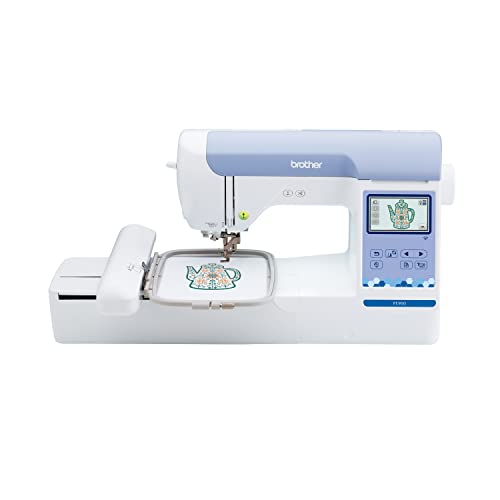
The PE900 is the most straightforward pick for a small business that already owns a sewing machine and wants a dedicated embroidery station. Its 5 by 7 inch field handles the bulk of commercial embroidery work, from left-chest logos to towel monograms, without the rehooping that a smaller field forces. Wireless transfer means designs can be sent from a computer without carrying a memory stick back and forth, and automatic jump stitch trimming saves a surprising amount of finishing time across a batch. It is a focused tool, with no sewing functions to learn or maintain, and that focus keeps the daily workflow simple.
Specs
- Embroidery-only machine
- 5 by 7 inch embroidery field
- 193 built-in embroidery designs
- 13 lettering fonts
- Wireless LAN design transfer
- Automatic jump stitch trimming
Best for: A small shop that needs a dedicated embroidery machine beside an existing sewing machine.
Watch out for: It does not sew, so check that you already have a sewing machine for hems, repairs, and patch attachment before choosing it.
Brother SE2000 Sewing and Embroidery Machine

The SE2000 is the pick for a one-machine business, where the same table has to sew a garment and then embroider it. It shares the PE900 embroidery side, with the same 5 by 7 inch field, 193 built-in designs, and 13 lettering fonts, then adds a full sewing menu of 241 stitches and ten one-step buttonhole styles. That combination suits makers who sell finished items rather than embroidery alone, such as personalised baby clothes, lined tote bags, and custom aprons. Wireless transfer and a colour touchscreen keep design placement visible, and the jump stitch cutter reduces the hand trimming that slows a batch of lettering orders.
Specs
- Sewing and embroidery combination machine
- 5 by 7 inch embroidery field
- 193 built-in embroidery designs
- 13 lettering fonts
- 241 built-in sewing stitches
- 10 one-step buttonhole styles
- Wireless LAN design transfer
- Automatic jump stitch trimming
- 3.7 inch colour touchscreen
Best for: A maker who wants one Brother machine to sew and embroider finished products.
Watch out for: Switching between sewing and embroidery means fitting and removing the embroidery unit, so plan the order of jobs to avoid changing modes in the middle of a batch.
Brother Innov-is NQ1700E Embroidery Machine

The NQ1700E is the step up when a 5 by 7 inch field starts to limit the orders you can accept. Its 6 by 10 inch field stitches jacket backs, large sweatshirt graphics, and wide quilt blocks in one hooping, and the 258 built-in designs give a wider starting library for customers who want a ready-made motif rather than a custom logo. The larger colour touchscreen makes it easier to view, resize, and position a design before stitching. This listing includes BES Blue lettering software, which is useful for names, team lists, and monogram orders that repeat with small changes.
Specs
- Embroidery-only machine
- 6 by 10 inch embroidery field
- 258 built-in embroidery designs
- 13 lettering fonts
- 140 frame pattern combinations
- 4.85 inch colour LCD touchscreen
- Wireless design transfer
- Automatic jump stitch trimming
- BES Blue lettering software included in this listing
- Stitching speed up to 850 stitches per minute
Best for: A growing shop that regularly stitches larger designs and wants fewer rehoops.
Watch out for: It is a larger, heavier bench machine with no sewing function, so confirm table space and that a separate sewing machine is available for finishing work.
Brother PE800 Embroidery Machine

The PE800 is the proven entry point in this guide, and it suits a new business that wants to take paid orders without committing to the newest model. Its 5 by 7 inch hoop area matches the PE900 for design size, and the 138 built-in designs plus 11 font styles cover monograms, names, and simple motifs for towels, shirts, and baby items. A USB port provides a simple way to load customer files, and the 3.2 inch LCD touchscreen keeps design selection and editing on the machine itself. It lacks wireless transfer, so the workflow is a little more manual, but for low-volume orders that difference is small.
Specs
- Embroidery-only machine
- 138 built-in embroidery designs
- 5 by 7 inch hoop area
- 3.2 inch LCD touchscreen
- USB port
- 11 font styles
Best for: A new small business taking its first paid embroidery orders at low volume.
Watch out for: There is no wireless design transfer, so check that you are comfortable loading designs by USB, and confirm the listing contents before ordering, as bundles vary.
Which One Fits Your Situation
You already own a sewing machine and take logo orders
Choose the Brother PE900. It is a dedicated embroidery machine, so it stays set up and ready, and the 5 by 7 inch field plus wireless transfer fits the rhythm of repeat logo work. The automatic jump stitch trimming keeps finishing time down across a batch of shirts or towels.
You make and sell finished items from one workspace
Choose the Brother SE2000. It sews and embroiders, so a personalised garment can be constructed, hemmed, and embroidered without a second machine. The shared 5 by 7 inch embroidery field means you lose nothing on design size compared with the PE900. That saves a second machine, a second workspace, and the time spent moving garments between tables.
Your customers keep asking for larger designs
Choose the Brother Innov-is NQ1700E. The 6 by 10 inch field, larger screen, and BES Blue lettering software suit jacket backs, sweatshirts, and wide designs that a 5 by 7 inch hoop would split. It is the right move once rehooping, rather than stitching, is taking most of your time.
You are testing whether embroidery can become a business
Choose the Brother PE800. It offers the same 5 by 7 inch working area as the newer embroidery-only models, with a simpler USB workflow and a proven design library. Start with small, simple orders, learn hooping and stabiliser choice, and upgrade only when order volume, not curiosity, demands it. Track which designs sell before spending on a larger machine.
Common Mistakes
- Choosing a 4 by 4 inch field for a business, then discovering that most customer logos need rehooping or shrinking to fit.
- Buying an embroidery-only machine and then realising there is no sewing machine available for hems, repairs, or attaching patches.
- Ordering a machine without checking which hoops, software, and accessories are included in that exact Amazon listing, since bundles vary by seller.
- Skipping stabiliser testing on the real garment fabric, which leads to puckering, distortion, or designs that shift during a batch.
- Taking a large multi-colour order before practising thread changes and design placement, and then missing the delivery date while learning on a paid job.
Frequently Asked Questions
Can a single-needle Brother machine run a small embroidery business?
Yes, for low to moderate volumes. A single-needle machine handles one-off gifts, small batches, and personalised orders well. The limit is thread changes: every colour change is manual, so large repeat orders take longer than they would on a multi-needle machine.
Is a 5 by 7 inch hoop large enough for most small business orders?
Yes, for most work. A 5 by 7 inch field covers left-chest logos, names, towel monograms, tote fronts, and many cap designs. Move to a 6 by 10 inch field when jacket backs, sweatshirt graphics, or wide designs become a regular part of your orders.
Do I need a separate sewing machine as well?
It depends on what you sell. If customers supply finished garments and you only add embroidery, an embroidery-only machine is enough. If you construct garments, attach patches, or finish hems, you need sewing capability, either as a second machine or by choosing a combination model such as the SE2000.
How do I send a customer logo to a Brother embroidery machine?
Use the transfer method shown on the listing for your model. The PE900, SE2000, and NQ1700E support wireless transfer from a computer, while the PE800 loads designs through a USB port. Always test the file on scrap fabric first, and check the size, placement, and thread colours before stitching the real garment.
Related guides
More from Amazon
Programs that pair well with the guide above. Offers and eligibility are set by Amazon and may change.
Free shipping on eligible items, Prime Video and more. Eligible new members can start with a free trial.
Start a Prime free trialAudiobooks and podcasts to listen to on the go. Eligible new members can start with a free trial.
Try Audible freeAd-free music streaming. Eligible new subscribers can start with a free trial.
Try Music Unlimited freeA free business account with business pricing and bulk-buying tools for work, shop or home office.
Create a business accountAs an Amazon Associate we earn from qualifying purchases.










Write Your Review
No reviews yet. Be the first to share your experience!