
Key takeaways
- Find an affordable embroidery machine for your small business with the right hoop size, design library, and transfer options for steady daily orders.
What's inside
As an Amazon Associate I earn from qualifying purchases. This post may contain affiliate links at no extra cost to you.
For a small embroidery business, the real decision is not the largest hoop or the longest feature list. It is how many finished pieces you can turn around in a day without re-hooping a design, re-threading for every color change, or walking a file back to a computer. A machine that stalls on a repeat logo order or forces you to split every chest design across two hoopings eats the margin on each piece, and that cost shows up long before the machine itself is paid off.
This guide is for home-based embroiderers, online sellers, and small shops personalizing caps, towels, tote bags, and workwear. Each machine below was chosen from the name and specifications stated on its Amazon listing, with hoop size, built-in designs, design transfer options, and stitching speed checked against what the listing states.
Quick Picks
As an Amazon Associate we earn from qualifying purchases.
| Product | Best for | Key spec from title |
|---|---|---|
| Brother PE545 | Starting a small embroidery side business with the smallest outlay | 4″ x 4″ hoop area, 135 built-in designs |
| Brother PE800 | Embroidery-only work with a larger field for towels and chest designs | 5″ x 7″ hoop area, 138 built-in designs |
| Brother PE900 | Wireless design transfer and faster multi-color logo work | 5″ x 7″ field, 193 built-in designs, Wireless LAN |
| Brother SE2000 | One machine that sews garments and embroiders them in a small shop | 5″ x 7″ field, 241 sewing stitches, Wireless LAN |
How to Choose
Match the hoop size to the orders you actually take
Hoop size decides what you can stitch in one setup, and that decides how fast an order moves. A 4″ x 4″ field handles names, monograms, small patches, and left-chest logos, which covers a large share of starter orders. A 5″ x 7″ field takes larger chest designs, towel borders, and tote bag artwork without splitting the design and re-hooping the fabric. Before choosing, list the five designs you expect to stitch most often and check each one against the field size. If most of them fit in 4″ x 4″, the smaller field saves outlay; if they do not, the re-hooping time will cost more than the larger machine.
Count the thread changes in a typical logo
Every machine here is single-needle, so each color change in a design means stopping, re-threading, and restarting by hand. A three-color name takes minutes; an eight-color logo takes much longer, and that time multiplies across a run of twenty shirts. Features that trim this burden matter more for business use than for hobby use: jump-stitch trimming cuts the loose threads between design sections, and color sorting groups same-color sections together so the machine changes thread less often. Ask how many colors your most common customer logo uses, then weigh the machine that handles those changes with the least manual work.
Check how designs reach the machine
A built-in design library and an easy transfer method decide how quickly you can start a paid order. Built-in designs and fonts let you take monogram and name orders on day one without buying digitizing software or paying for outside digitizing. USB transfer works on every machine here, while wireless transfer lets you send a file from a phone or computer without moving a drive between devices. Confirm the file type your digitizer supplies and the transfer method you will use daily, because a machine that cannot accept your files in a practical way will slow every order.
Decide between embroidery-only and a sewing combination
An embroidery-only machine puts the whole outlay into the embroidery field and embroidery features, which suits a shop that already owns a sewing machine or never sews at all. A combination machine sews and embroiders in one unit, which saves workspace and replaces two purchases with one, and it suits a shop that makes garments and then adds embroidery to them. The trade-off is dependence: when a combination machine goes in for service, both sewing and embroidery stop at once. Match this choice to the work you already do, not to the work you hope to add later.
The 4 Best Options
Brother PE545
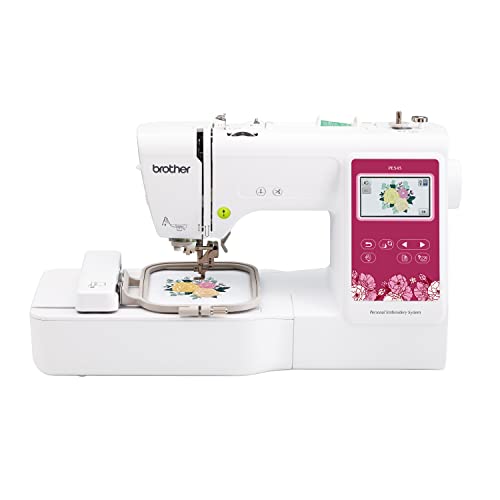
The PE545 is the lowest-outlay starting point in this guide, and it suits a seller testing whether embroidery orders will support a business at all. Its 4″ x 4″ field covers names, monograms, patches, and small logos, which are the orders most new sellers take first. Wireless transfer and a USB port give two ways to load designs, and the touchscreen keeps setup simple for someone running the machine alone. It is a sensible first machine when order volume is still unproven and every accessory still has to be bought.
Specs
- 135 built-in embroidery designs
- 4″ x 4″ hoop area
- Large 3.7″ LCD touchscreen
- Wireless LAN connected
- USB port
- 10 font styles
Best for: New sellers taking small personalization orders such as names, monograms, and patches.
Watch out for: The 4″ x 4″ field cannot stitch a full chest logo in one hooping, so check your most common design size before ordering.
Brother PE800

The PE800 is an embroidery-only machine built around a 5″ x 7″ field, which makes it a practical step up for a shop that has outgrown small-field work. Its 138 built-in designs and 11 font styles cover a wide range of name, logo, and decorative orders without outside digitizing. The touchscreen and USB transfer keep the workflow straightforward, and the larger field handles towel designs and chest artwork that a 4″ x 4″ machine would have to split. It suits a seller who already owns a sewing machine and wants a dedicated embroidery unit.
Specs
- 138 built-in embroidery designs
- 5″ x 7″ hoop area
- Large 3.2″ LCD touchscreen
- USB port
- 11 font styles
- Embroidery-only machine
Best for: Shops that already own a sewing machine and want a dedicated embroidery unit with a larger field.
Watch out for: There is no wireless transfer on this model, so designs move by USB drive; confirm the included hoop and accessories on the listing before ordering.
Brother PE900
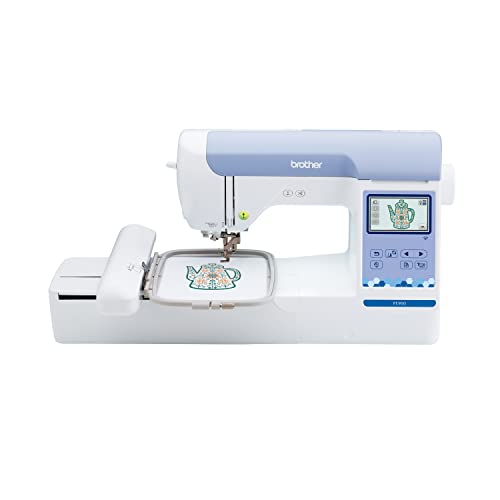
The PE900 is the current embroidery-only model in this guide, and it is the strongest fit for a small business running multi-color logos every day. Wireless transfer moves designs from a phone or computer without a drive, and the larger built-in library of 193 designs with 13 fonts reduces how often you need outside digitizing. Color sorting and jump-stitch trimming cut the manual thread work that slows down multi-color orders, and the automatic thread cutter trims between sections. Its 5″ x 7″ field covers the chest designs and towel work that make up most paid embroidery.
Specs
- 193 built-in embroidery designs
- 13 embroidery fonts
- 5″ x 7″ embroidery field
- Wireless LAN
- USB port
- 3.7″ color LCD touchscreen
- Up to 650 stitches per minute
- Color Sort function
- Jump-stitch trimming
- Automatic thread cutter
Best for: Sellers handling repeat multi-color logo orders who want wireless transfer and less manual thread trimming.
Watch out for: It is embroidery-only, so it cannot sew garments; it is still a single-needle machine, so every color change is manual.
Brother SE2000

The SE2000 is the combination choice in this guide, sewing and embroidering in a single unit for a small shop with limited workspace. Its 5″ x 7″ field handles the same chest designs and towel work as the embroidery-only models above, while 241 built-in sewing stitches cover garment construction and repairs alongside embroidery. Wireless transfer and Artspira app compatibility let you send designs and draw custom ones from a mobile device. It suits a shop that makes items and personalizes them in the same room, without buying and housing two machines.
Specs
- 5″ x 7″ field size
- 241 built-in sewing stitches
- Cuts jump stitches
- Wireless LAN
- Artspira app compatibility
- Computerized sewing and embroidery combination
Best for: Small shops that sew garments and add embroidery to them in one workspace.
Watch out for: One machine doing two jobs means both sewing and embroidery stop when it goes in for service, so plan a backup for deadline orders.
Which One Fits Your Situation
You are starting out and orders are still unproven
Choose the Brother PE545. Its small field covers the names, monograms, and patches that new sellers take first, and its wireless transfer and built-in designs let you start paid work without extra software. Keep the outlay low until repeat orders show which designs customers actually request, then upgrade toward a larger field with evidence rather than a guess.
You already own a sewing machine and want bigger embroidery
Choose the Brother PE900 if wireless transfer matters to your daily workflow, or the Brother PE800 if USB transfer is enough and you want the simpler embroidery-only setup. Both give you the 5″ x 7″ field for chest designs and towel work, while your existing sewing machine keeps garment work separate from embroidery.
You stitch multi-color logos every day
Choose the Brother PE900. Its color sorting and jump-stitch trimming reduce the manual thread work that slows multi-color runs, and wireless transfer keeps designs moving without a drive. The larger built-in library also cuts how often you pay for outside digitizing on common logo and lettering work. That combination matters most when the same logo repeats across a full run of shirts, caps, or tote bags.
You sew garments and embroider them in one small room
Choose the Brother SE2000. It sews and embroiders in one unit, so a single workspace covers construction and personalization, and the 5″ x 7″ field handles the chest designs your customers order most. Confirm the included feet and accessories on the listing, since a combination machine earns its place only when both sides of the work are covered.
Common Mistakes
- Choosing on hoop size alone without checking how designs transfer to the machine and which file types it accepts.
- Forgetting stabilizer, thread, bobbins, and needles in the startup budget, then finding the first orders cost more than expected.
- Buying an embroidery-only machine when the shop also needs regular sewing, or buying a combination machine when embroidery is the only work.
- Ordering a bundle listing without checking whether it is the machine alone or a bundle with hoops, thread, and accessories.
- Starting a customer order without a test stitch on the same fabric and stabilizer, which risks wasted garments and missed deadlines.
Frequently Asked Questions
Can a single-needle machine handle small business orders?
Yes, for low to moderate volume. A single-needle machine stitches one color at a time, so each color change is manual, but names, monograms, patches, and small logos move quickly. It becomes a bottleneck only when daily volume grows into long multi-color runs, at which point a multi-needle machine is the next step rather than a replacement for good workflow.
Do I need a combination machine or an embroidery-only machine?
Choose a combination machine if you sew garments and embroider them in the same workspace, since one unit covers both jobs. Choose an embroidery-only machine if you already own a sewing machine or never sew, because the whole outlay goes into the embroidery field and embroidery features instead of sewing functions you will not use.
What hoop size do I need for chest logos?
A 5″ x 7″ field covers most left-chest logos, towel designs, and tote bag artwork in a single hooping. A 4″ x 4″ field handles names, monograms, and small patches, but a full chest design will need splitting and re-hooping. Measure your most common customer design before choosing, and pick the field that fits it without extra steps.
Can I use my own designs on these machines?
Yes. All four machines accept designs by USB, and the PE545, PE900, and SE2000 also accept wireless transfer. Built-in designs and fonts cover many starter orders, while custom work needs a digitized file in a format the machine accepts. Confirm the file format with your digitizer before taking a custom order, and test the file on scrap fabric first.
Related guides
More from Amazon
Programs that pair well with the guide above. Offers and eligibility are set by Amazon and may change.
Free shipping on eligible items, Prime Video and more. Eligible new members can start with a free trial.
Start a Prime free trialAudiobooks and podcasts to listen to on the go. Eligible new members can start with a free trial.
Try Audible freeAd-free music streaming. Eligible new subscribers can start with a free trial.
Try Music Unlimited freeA free business account with business pricing and bulk-buying tools for work, shop or home office.
Create a business accountAs an Amazon Associate we earn from qualifying purchases.










Write Your Review
No reviews yet. Be the first to share your experience!