
Key takeaways
- Find the best Brother embroidery machine for beginners, with hoop sizes, built-in designs, touchscreens, and easy setup compared for new stitchers.
What's inside
As an Amazon Associate I earn from qualifying purchases. This post may contain affiliate links at no extra cost to you.
Starting machine embroidery can feel like learning a new language, with hoops, stabilizers, thread paths, and design files all competing for attention at once. That is why choosing the best Brother embroidery machine for beginners matters so much. A machine that is simple to thread, easy to navigate, and forgiving while you learn lets you focus on the creative part of the craft. Brother has built a strong reputation among new embroiderers for clear on-screen guidance, built-in designs that work straight out of the box, and machines that grow with you as your skills develop.
This guide looks at three current Brother models, each with a color touchscreen, a USB port, wireless design transfer, and built-in designs, so you can start stitching without extra software. They differ mainly in hoop size and in whether they also sew. Understanding those differences will help you pick a machine that fits the projects you want to make, from monogrammed towels and baby gifts to tote bags and quilt blocks.
What to Look For in a Brother Embroidery Machine for Beginners
Hoop Size
Hoop size sets the largest design you can stitch in one hooping. A 4 inch by 4 inch hoop handles monograms, small motifs, patches, and designs for baby clothes and towels. A 5 inch by 7 inch hoop opens up larger monograms, quilt blocks, and designs that span a tote bag or pillow cover. Beginners often start with smaller projects, so a 4 inch by 4 inch hoop is enough for many first makes. If you want larger designs without splitting them across two hoopings, a 5 inch by 7 inch hoop gives you more freedom, though it also means a larger machine footprint, so measure your workspace first.
Built-In Designs and Fonts
Built-in designs are the quickest way to learn. With a library already loaded, you can choose a flower, a border, or a monogram letter, view it on the screen, and start stitching within minutes. Look for a good mix rather than a large number alone: monogram alphabets, floral motifs, borders, and seasonal designs. Fonts matter just as much, because personalization is a main reason beginners buy an embroidery machine. Several built-in lettering styles let you monogram names and initials in different looks without importing anything. Each machine here includes more than one hundred built-in designs and several fonts, plenty for a first year of projects.
Touchscreen and On-Screen Editing
A color touchscreen changes the learning curve more than almost any other feature. You can see the design in color, drag it into position, rotate it, flip it, resize it, and combine it with lettering directly on the screen. Clear menus walk you through threading, bobbin winding, and hoop attachment step by step, and a clear on-screen view helps prevent mistakes such as stitching a design upside down or off center. All three machines here have a color LCD touchscreen and let you edit designs on the machine before you stitch.
USB Port and Wireless Transfer
A USB port lets you bring designs from a computer to the machine on a flash drive, the simplest way to expand beyond the built-in library. Wireless LAN adds another option: send designs from a computer or a compatible mobile app without a cable. These Brother machines support both, along with the Artspira app, which lets you draw simple designs or choose downloadable patterns on a phone or tablet and send them to the machine. You are not locked into the built-in designs, and you can try new patterns as soon as you feel ready, without learning complex software first.
Ease of Use for Beginners
Several small features add up to a beginner-friendly machine. An automatic needle threader removes one of the most difficult steps for new users. Clear bobbin winding and on-screen threading guides reduce setup errors. Automatic thread trimming, where fitted, cuts jump stitches between design sections so the finished piece looks cleaner with less hand trimming. A well-lit work area helps you see the needle, fabric, and hoop clearly. A machine that also sews can be useful if you want one machine for both crafts, although a dedicated embroidery-only machine keeps the focus entirely on stitching designs.
The Best Brother Embroidery Machines for Beginners
1. Brother PE900 Embroidery Machine with WLAN
Amazon link: https://www.amazon.com/dp/B0B8337QHR
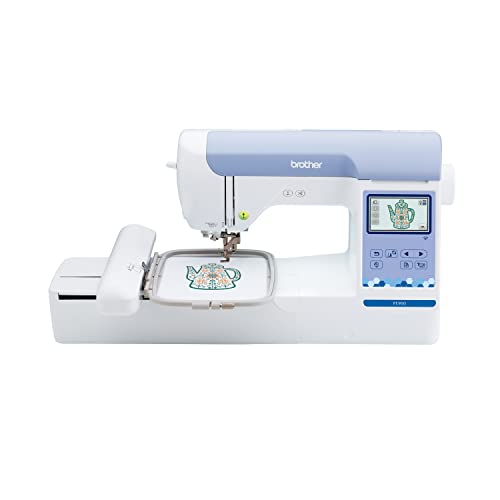
The Brother PE900 is an embroidery-only machine built around a generous 5 inch by 7 inch embroidery field, a strong choice for a beginner who wants room to grow. The listing describes 193 built-in embroidery designs plus 50 bonus designs through the Artspira app, along with 13 built-in embroidery fonts, covering monograms, florals, borders, and decorative motifs.
The PE900 includes wireless LAN and a USB port. Wireless transfer works with the free Design Database Transfer software and with the Artspira app, where you can draw a design or choose a downloadable pattern and send it to the machine. It also includes automatic jump stitch trimming, which cuts connecting threads between sections as it stitches, leaving a cleaner finish. Other listing features include a large color LCD touchscreen, an advanced built-in needle threader, and LED workspace lighting.
Who it suits: A beginner who wants an embroidery-only machine with a larger hoop, a wide built-in design library, and wireless design transfer, and who plans to stitch larger projects from the start.
Considerations: As an embroidery-only machine, the PE900 does not sew, so you will still need a separate sewing machine if you sew as well as embroider. The larger hoop also means a larger machine, so check that your table has enough clear space for the hoop to move freely. The 50 bonus designs require the Artspira app and a firmware update, and a USB drive is required for that update.
2. Brother PE545 Embroidery Machine
Amazon link: https://www.amazon.com/dp/B0B8DSJKTH
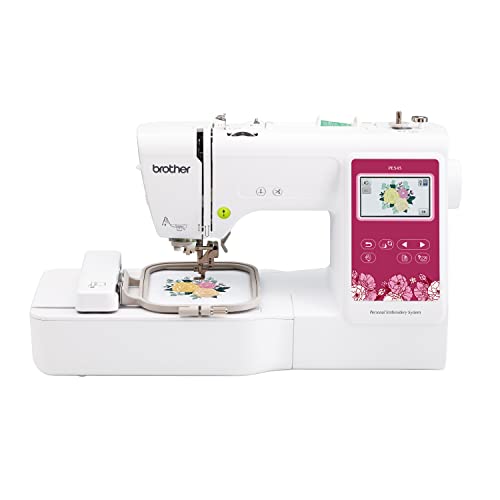
The Brother PE545 is a compact embroidery-only machine with a 4 inch by 4 inch hoop area, and one of the most approachable starting points in the Brother range. The listing describes 135 built-in embroidery designs, a 3.7 inch LCD touchscreen, a USB port, wireless LAN connectivity, and 10 font styles, enough to personalize towels, baby clothes, tote bags, and small home decor items without importing anything at first.
You can view a design in color, edit its size and position, and add lettering on the screen before stitching. Wireless LAN lets you send designs from a computer using Design Database Transfer software, or use the Artspira app to draw a design or choose a downloadable pattern and transfer it to the machine. The USB port gives you a simple alternative for loading designs from a flash drive. The listing also notes an automatic needle threader and a bright work area. The compact 4 inch by 4 inch hoop suits the projects most beginners start with, including monograms, small floral motifs, patches, and designs for children’s clothing.
Who it suits: A beginner who wants a compact, focused embroidery machine for smaller projects, or someone with limited table space. It suits gift makers, monogram fans, and anyone starting with towels, baby items, and small personalized pieces.
Considerations: The 4 inch by 4 inch hoop limits the size of a single design, so larger monograms and quilt blocks will need to be split or stitched smaller. As an embroidery-only machine, the PE545 does not sew, so regular sewing still needs a separate machine.
3. Brother SE700 Sewing and Embroidery Machine

Amazon link: https://www.amazon.com/dp/B0B8DYP1RN
The Brother SE700 is a computerized combination machine that both sews and embroiders, a practical choice for a beginner who wants one machine for two crafts. The listing describes 135 built-in embroidery designs, 103 built-in sewing stitches, a 4 inch by 4 inch embroidery hoop area, a 3.7 inch touchscreen display, wireless LAN connectivity, and 8 included presser feet. You can sew a garment or a tote bag and then add embroidery to it on the same machine.
For embroidery, the SE700 works like the dedicated machines above: choose a design, view and edit it on the touchscreen, hoop the fabric with stabilizer, and stitch. Wireless LAN supports design transfer from a computer and from the Artspira app, and the USB port lets you load designs from a flash drive. For sewing, the 103 built-in stitches include utility, decorative, and heirloom stitches, along with buttonhole options described in the listing. The 8 included feet cover common sewing tasks, and the listing also notes an automatic needle threader and a clear threading path.
Who it suits: A beginner who wants to sew and embroider with a single machine. It suits makers who personalize the things they sew, from children’s clothes and tote bags to home decor and gifts.
Considerations: The embroidery area is 4 inches by 4 inches, so larger designs need to be split or scaled down, just as with the PE545. Because the SE700 combines two functions, you will spend a little time switching between sewing and embroidery setups, including attaching and removing the embroidery unit.
Comparison Table
| Feature | Brother PE900 | Brother PE545 | Brother SE700 |
|---|---|---|---|
| Machine type | Embroidery only | Embroidery only | Sewing and embroidery |
| Embroidery field | 5 inch by 7 inch | 4 inch by 4 inch | 4 inch by 4 inch |
| Built-in embroidery designs | 193, plus 50 bonus designs through Artspira | 135 | 135 |
| Built-in fonts | 13 embroidery fonts | 10 font styles | Lettering included in design library |
| Built-in sewing stitches | Not applicable, embroidery only | Not applicable, embroidery only | 103 |
| Touchscreen | Color LCD touchscreen | 3.7 inch LCD touchscreen | 3.7 inch touchscreen display |
| Design transfer | Wireless LAN and USB port | Wireless LAN and USB port | Wireless LAN and USB port |
| Artspira app | Yes | Yes | Yes |
| Automatic needle threader | Yes | Yes | Yes |
| Automatic jump stitch trimming | Yes | Not listed as a headline feature | Not listed as a headline feature |
| Included presser feet | Embroidery foot and accessories listed for embroidery use | Embroidery accessories listed for embroidery use | 8 included feet |
| Best for | Larger embroidery projects and room to grow | Compact first embroidery machine for smaller projects | Sewing and embroidery in one machine |
Choosing for Your Use Case
Your best choice depends on the projects you picture yourself making in the next year. If you want to embroider large monograms, quilt blocks, and designs that fill a tote bag panel, the PE900 and its 5 inch by 7 inch field give you the most room and the fewest split designs. It is the natural pick if embroidery is your main craft and you want a machine that will still feel roomy after a year of practice.
If your first projects are smaller, the PE545 is a sensible place to start. Monograms on towels, names on baby clothes, small floral designs on tote bags, and patches all fit comfortably in a 4 inch by 4 inch hoop. The compact size is easier to store and to set up on a shared table, and the focused embroidery-only layout keeps the menus simple.
If you sew as well as embroider, the SE700 covers both crafts in one machine. You can sew a simple tote bag, a child’s dress, or a cushion cover, and then embroider a name or a motif on it without changing machines. The trade-off is the smaller hoop and the need to switch modes. Think about space, too: a 5 inch by 7 inch hoop needs clear space around the machine for the hoop to travel, while a 4 inch by 4 inch machine fits more easily on a desk and is simpler to store.
All three machines use standard embroidery thread and stabilizer, and the right stabilizer depends on the fabric. A stable woven fabric needs lighter stabilizer than a stretchy knit, and a towel needs a different setup from a fine cotton shirt. Keep a small stock of embroidery needles, bobbins, and stabilizer on hand so you can practice without a trip to the store each time you want to stitch.
Care and Use for Beginners
Good habits from the first week will keep your machine stitching well. Read the threading guide for your model and follow it in order, because correct threading prevents many common problems such as skipped stitches and thread bunching under the fabric. Wind bobbins evenly, use the bobbin type recommended for your machine, and change the needle regularly, especially after heavy fabric or a needle strike on the hoop.
Hooping takes practice. Place the stabilizer under the fabric, smooth the fabric without stretching it, and tighten the hoop just enough to hold the layers flat, without distorting the weave. Mark the center of your design area with a removable fabric marker, and use the on-screen positioning tools to line up the design with that mark. Stitch a practice piece on similar fabric before you stitch a gift or a garment, so you can check thread colors, design size, and placement without risk.
Clean the bobbin area regularly with the brush supplied with the machine, and remove lint after each project. Keep the machine covered when it is not in use, on a stable, level table, with the area around the hoop clear so the hoop can move without catching on thread spools or tools. If a design stops mid-stitch or the thread breaks, pause the machine, check the threading path and the bobbin, rethread if needed, and resume using the on-screen controls. Start with a built-in design on plain cotton, then try lettering, then try a design from a flash drive or from the Artspira app.
Frequently Asked Questions
Do I need a computer to use a Brother embroidery machine for beginners?
No. All three machines include built-in designs and fonts, a touchscreen for editing, and a USB port, so you can choose a design on the machine and stitch without a computer. A computer is useful when you want to download new designs or send files wirelessly, and the Artspira app lets you use a phone or tablet for some of those tasks. For your first projects, the built-in library is enough.
Is a 4 inch by 4 inch hoop big enough for a beginner?
For most first projects, yes. A 4 inch by 4 inch hoop fits monograms, small motifs, names on baby clothes, towel designs, and patches, and both the PE545 and the SE700 use it. If you plan to stitch large designs, quilt blocks, or wide monograms from the start, a 5 inch by 7 inch hoop like the one on the PE900 gives you more room and fewer split designs.
Should a beginner choose an embroidery-only machine or a sewing and embroidery combination?
Choose an embroidery-only machine if embroidery is your main interest and you already have a sewing machine, or if you want the simplest menus. Choose a combination machine like the SE700 if you want to sew and embroider with one machine. Both types stitch embroidery in the same way, so the choice comes down to how you will use the machine most often.
What supplies do I need besides the machine?
You will need embroidery thread, bobbins, embroidery needles, stabilizer, and fabric to practice on. Stabilizer is the backing that supports the fabric while the machine stitches, and the right type depends on the fabric. You will also need scissors, a fabric marker, and a flash drive if you plan to load designs from a computer. A starter set of thread colors that match your first projects is more useful than a large collection you have not planned for.
Can I use my own designs on these Brother machines?
Yes. All three machines have a USB port for loading designs from a flash drive, and wireless LAN for sending designs from a computer or from the Artspira app. Designs need to be in a format the machine can read, and the manual lists the supported formats. Start with the built-in designs, then try one imported design on practice fabric before stitching it on a finished item.
Conclusion
The best Brother embroidery machine for beginners is the one that matches the size of the projects you want to make and the way you like to work. The Brother PE900 gives you the largest embroidery field and the widest built-in library, which suits larger projects and longer-term growth. The Brother PE545 keeps things compact and focused, which suits smaller projects and limited space. The Brother SE700 adds full sewing capability, which suits makers who want one machine for both crafts. All three share the features that matter most when you are learning: a color touchscreen, built-in designs and fonts, USB and wireless design transfer, and an automatic needle threader.
Disclosure: As an Amazon Associate, we earn from qualifying purchases.
Related guides
More from Amazon
Programs that pair well with the guide above. Offers and eligibility are set by Amazon and may change.
Free shipping on eligible items, Prime Video and more. Eligible new members can start with a free trial.
Start a Prime free trialAudiobooks and podcasts to listen to on the go. Eligible new members can start with a free trial.
Try Audible freeAd-free music streaming. Eligible new subscribers can start with a free trial.
Try Music Unlimited freeA free business account with business pricing and bulk-buying tools for work, shop or home office.
Create a business accountAs an Amazon Associate we earn from qualifying purchases.










Write Your Review
No reviews yet. Be the first to share your experience!