
Key takeaways
- Find the best commercial embroidery machine for beginners, with multi-needle heads, large hoops, and simple controls. Compare three commercial-class picks.
What's inside
As an Amazon Associate I earn from qualifying purchases. This post may contain affiliate links at no extra cost to you.
Choosing the best commercial embroidery machine for beginners is less about chasing the biggest machine and more about finding a commercial-class machine that a new operator can actually learn on. A commercial embroidery machine earns its name through a multi-needle head, a sturdy build, faster stitching, and the ability to run the same design again and again with consistent results. For a beginner, the right machine pairs that commercial capability with clear on-screen controls, guided threading, automatic thread trimming, and enough built-in designs to practice with before moving on to custom work.
The three machines below are all multi-needle, commercial-class embroidery machines listed on Amazon US. Each one suits a slightly different beginner: one is a compact six-needle machine with wireless design transfer, one is a seven-needle machine known for a gentle learning curve, and one is a ten-needle machine built around a large touchscreen and cap embroidery.
What to Look For in a Commercial Embroidery Machine for Beginners
Multi-needle heads
The defining feature of a commercial embroidery machine is a multi-needle head. Instead of stopping to rethread for every color change, a multi-needle machine holds several threaded needles at once and switches between them automatically. A six-needle machine handles most logos and monograms without a thread change, a seven-needle machine adds one more color, and a ten-needle machine covers nearly every multi-color design in a single run. For a beginner, more needles mean fewer interruptions, fewer chances to mis-thread, and a smoother first experience with multi-color designs.
Stitching speed
Commercial machines stitch faster than single-needle home machines, and speed is measured in stitches per minute. The machines in this guide list maximum speeds of 800 to 1,000 stitches per minute. Beginners do not need to run at maximum speed right away. In fact, beginning more slowly helps while learning to hoop fabric, watch thread tension, and spot problems early. What matters is that the machine holds a steady speed without vibration and lets the operator slow down for delicate fabrics or detailed lettering.
Hoop sizes and embroidery area
The maximum embroidery area decides how large a design can be stitched in one hooping. A larger area suits jacket backs, tote bags, and large chest designs, while smaller hoops suit caps, sleeves, shirt pockets, and baby items. Beginners should look for a machine that includes several hoop sizes in the box. A machine that accepts cap frames or a cap driver is a bonus for anyone who plans to embroider hats.
Commercial build and weight
Commercial-class machines are heavier and more rigid than home machines, and that weight is a feature. A solid frame reduces vibration at high speed, which keeps stitch quality consistent across long runs. The trade-off is that these machines need a dedicated table or stand and are not meant to be carried from room to room.
Built-in designs, fonts, and editing
Built-in designs and lettering fonts let a beginner stitch finished projects on day one without buying digitizing software. Look for a useful number of built-in designs, several monogramming or lettering fonts, and on-screen editing tools for resizing, rotating, and combining designs. A large, bright touchscreen makes these tools far easier to use than a small monochrome screen, especially when checking a design on screen before stitching.
File compatibility and connectivity
Most commercial machines read standard embroidery file formats through a USB connection, and some add wireless transfer or an Ethernet connection. Format support matters because designs bought or downloaded from digitizers usually arrive in a specific format. Beginners should confirm that the machine reads the formats their chosen design sources use, and that transferring a design from a computer is a simple, documented process.
Thread handling and automatic features
Automatic needle threading, automatic thread trimming, and automatic return after a thread break are the features that spare beginners the most frustration. A machine that trims jump threads between color blocks produces cleaner finished work with less hand trimming. A sensor that pauses the machine when thread breaks, then returns to the right stitch, prevents ruined garments and wasted blanks.
Training and support for beginners
A commercial embroidery machine is a long-term purchase, so beginner support matters as much as the hardware. Look for a manufacturer that provides instructional videos, a detailed manual, responsive technical support, and a clear warranty. Some brands include digitizing software access or live training with the machine. For a first commercial machine, strong support shortens the learning curve more than any single hardware feature.
Best Commercial Embroidery Machines for Beginners
1. Brother Entrepreneur PR680W 6-Needle Embroidery Machine

ASIN: B0B4QVB71K
Amazon link: https://www.amazon.com/dp/B0B4QVB71K
The Brother Entrepreneur PR680W is a six-needle commercial-class embroidery machine built for embroiderers who are moving from home sewing into small-batch production. It pairs a compact multi-needle head with wireless connectivity and a large color touchscreen, which makes it one of the most approachable commercial machines for a beginner who wants room to grow.
The PR680W stitches at up to 1,000 stitches per minute and handles a maximum embroidery area of 8 inches by 12 inches, which covers jacket backs, tote bags, and large chest designs in a single hooping. The 10.1-inch high-definition LCD touchscreen gives a clear view of designs before stitching, and the listing notes 100 built-in embroidery designs and 50 embroidery fonts for lettering and monogramming. On-screen editing tools allow designs to be resized, rotated, and combined, and color grouping and color sort features help organize multi-color designs before the first stitch.
Wireless data transfer is a practical advantage for beginners. Designs can be sent to the machine over Wi-Fi, and the Artspira app and the My Stitch Monitor app connect the machine to a phone or tablet for design transfer and progress monitoring. The machine also includes automatic needle threading and automatic thread trimming, which reduce the two most common beginner frustrations: threading six needles by hand and cleaning up jump threads after a design finishes.
Who it suits: A beginner who wants a compact commercial machine with wireless design transfer, a large touchscreen, and enough needles for most small-business logos and monograms.
Considerations: The six-needle head means designs with more than six colors need a thread change partway through. The machine is heavy and needs a dedicated workspace, and the touchscreen workflow rewards a beginner who is comfortable using apps and wireless transfer.
2. Janome MB-7 Seven-Needle Embroidery Machine
ASIN: B08WJPM8N3
Amazon link: https://www.amazon.com/dp/B08WJPM8N3
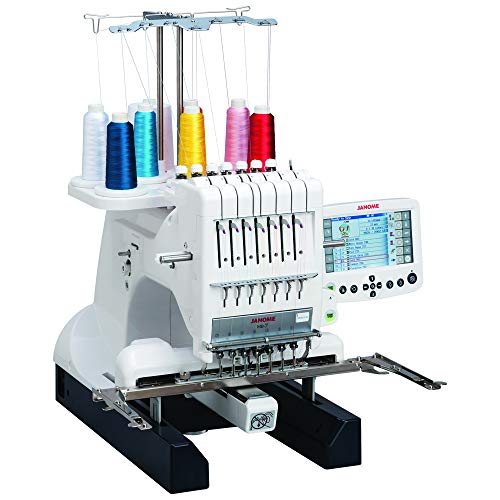
The Janome MB-7 is a single-head, seven-needle professional-style embroidery machine, and it has a reputation as one of the most beginner-friendly multi-needle machines. The listing describes a home-use seven-needle machine with a remote computer screen, and the manufacturer notes that the MB-7 is built for both beginners and experienced embroiderers. Its straightforward controls and modest footprint make it a natural first commercial-class machine.
The MB-7 stitches at up to 800 stitches per minute and handles a maximum embroidery area of 9.4 inches by 7.9 inches. It includes 50 built-in embroidery designs and 10 fonts for monogramming, including two-letter and three-letter monograms. Designs transfer through a USB connection, and the machine reads .jef, .jef+, and .dst embroidery formats, which covers the formats most digitizers and design sellers provide.
Three embroidery hoops are included in the box: a large hoop at 9.4 inches by 7.9 inches, a medium hoop at 5 inches by 4.3 inches, and a small hoop at 2 inches by 2 inches. That range lets a beginner practice on small items such as baby clothes and pockets, then move up to larger pieces without buying extra hoops. The machine also works with Tajima-style hoops, which widens the choice of third-party hoops and frames.
The MB-7 includes programmable jump thread trimming, an automatic return after a thread break, and an independent bobbin winder. The extra-large bobbin holds more thread than a standard bobbin, so long designs run longer before a bobbin change. Six white LED lamps light the needle area, and an instructional DVD is included with the machine.
Who it suits: A beginner who wants a proven seven-needle machine with a gentle learning curve, a useful set of included hoops, and a lighter frame that still delivers professional-style multi-needle embroidery.
Considerations: The 800 stitches per minute maximum speed is slower than the other machines here, and the 5.7-inch screen is smaller than the 10.1-inch touchscreens on the other two picks. Design transfer is by USB only, with no wireless connection.
3. Ricoma EM-1010 Commercial Embroidery Machine

ASIN: B0GRT7QC3D
Amazon link: https://www.amazon.com/dp/B0GRT7QC3D
The Ricoma EM-1010 is a ten-needle commercial embroidery machine listed on Amazon as a commercial machine for small business use, and Ricoma describes it as a machine designed for beginners. With ten needles, a 10.1-inch touchscreen, and a 220-degree cap rotation system, it is the most capable machine in this guide and the best fit for a beginner who plans to embroider caps and multi-color logos from day one.
The EM-1010 stitches at up to 1,000 stitches per minute and handles a maximum embroidery area of 12.2 inches by 8.3 inches. The 10.1-inch high-definition true-color touchscreen stores up to 100 million stitches or 1,000 designs, and designs can be viewed, edited, and managed directly on the screen. Custom lettering can be created on the panel, and the machine connects through USB or Ethernet. It reads DST embroidery files.
Four hoops are included, sized 2.7 inches by 1.9 inches, 4.3 inches by 4.3 inches, 7.5 inches by 5.5 inches, and 12.2 inches by 8.2 inches. The package also includes two cap rings, a cap driver, and a hoop station, which makes cap embroidery practical for a beginner without buying separate attachments. The 220-degree cap rotation system lets the machine stitch a wide arc on a cap in a single run. An automatic thread trimmer is listed for this machine.
The EM-1010 weighs 99 pounds and measures 23.6 inches by 22 inches by 34.1 inches, so it needs a solid stand or table. The Amazon listing notes that the steel stand is not included. Ricoma includes a beginner kit with threads, needles, and a toolbox, plus 12 months of Chroma embroidery software for digitizing and customizing designs, and lifetime customer support available seven days a week. The machine is prepared and checked at Ricoma’s Miami, Florida facility before shipping.
Who it suits: A beginner who wants the widest color range, the largest hoop set, and built-in cap embroidery, and who plans to take on custom orders for shirts, hats, jackets, and bags.
Considerations: At 99 pounds, the EM-1010 is the heaviest machine here and needs a dedicated stand, which is not included in the Amazon listing. The ten-needle head takes longer to thread than a six- or seven-needle head, and the machine reads DST files, so designs in other formats need conversion before use.
Comparison Table
| Feature | Brother PR680W | Janome MB-7 | Ricoma EM-1010 |
|---|---|---|---|
| Needles | 6 | 7 | 10 |
| Maximum speed | 1,000 stitches per minute | 800 stitches per minute | 1,000 stitches per minute |
| Maximum embroidery area | 8 x 12 inches | 9.4 x 7.9 inches | 12.2 x 8.3 inches |
| Screen | 10.1-inch HD LCD touchscreen | 5.7-inch remote computer screen | 10.1-inch HD true-color touchscreen |
| Built-in designs | 100 | 50 | Not listed |
| Built-in fonts | 50 embroidery fonts | 10 monogramming fonts | Lettering tools on screen |
| Design transfer | Wi-Fi, USB | USB | USB, Ethernet |
| File formats | DST and other common formats | .jef, .jef+, .dst | DST |
| Automatic thread trimming | Yes | Yes, programmable jump thread trimming | Yes |
| Included hoops | Hoops included | 3 hoops | 4 hoops, 2 cap rings, cap driver, hoop station |
| Cap embroidery | Cap frame available | Hat hoop available | 220-degree cap rotation system |
| Weight | Heavy, needs a dedicated table | About 50 pounds | 99 pounds |
| Machine dimensions | 20.08 x 23.23 x 29.92 inches | Not listed in this guide | 23.6 x 22 x 34.1 inches |
Choosing for Your Use Case
A beginner who plans to embroider mostly monograms, names, and simple logos on shirts and tote bags will find the Janome MB-7 the easiest machine to learn. Its seven needles cover most everyday designs, its included hoops handle small and medium projects, and its lighter frame fits a home studio. A beginner who wants wireless design transfer and a large touchscreen for on-screen editing will prefer the Brother PR680W, which adds app connectivity and a bigger embroidery area for jacket backs.
A beginner who plans to embroider caps and take custom orders with many colors should look closely at the Ricoma EM-1010. Ten needles mean almost no mid-design thread changes, and the included cap attachments remove the need to buy cap frames separately. The trade-off is size and weight: the EM-1010 needs a proper stand and a permanent spot in the workspace.
Care and Use for Beginners
A commercial embroidery machine rewards simple, regular care. Keep the machine covered when it is not in use so dust stays out of the needle area and bobbin case. Clean lint from around the bobbin and feed area after long sessions, and follow the manual for oiling points and intervals. Use the needle type and size the manufacturer recommends for the fabric, and change needles on a regular schedule rather than waiting for skipped stitches.
Hooping is the skill that decides most early results. Hoop the fabric and stabilizer together so the fabric is taut but not stretched, and choose a stabilizer that matches the fabric: cut-away stabilizer for stretchy knits, tear-away stabilizer for stable wovens. Run a practice stitch-out on scrap fabric before stitching a customer garment, and watch the first minutes of a new design so a thread break or hooping problem is caught early.
Thread choice matters as well. Use embroidery thread made for machine embroidery, keep thread cones or spools feeding freely without snagging, and store thread away from sunlight and dust. When a design puckers, the cause is usually hooping tension, stabilizer choice, or design density rather than the machine itself, so adjust one variable at a time.
Frequently Asked Questions
What makes an embroidery machine commercial?
A commercial embroidery machine uses a multi-needle head, a rigid frame, and a higher stitching speed than a single-needle home machine. It is built to stitch the same design repeatedly with consistent quality, and it usually includes automatic thread trimming, a larger embroidery area, and support for standard commercial embroidery file formats.
Is a multi-needle machine hard for a beginner to learn?
A multi-needle machine adds threading and setup steps compared with a single-needle machine, but it removes the constant rethreading that slows beginners down. Machines with a large touchscreen, automatic threading, and guided setup make the learning curve manageable, and most beginners become comfortable with basic operation after a few practice projects.
How many needles does a beginner need?
Six or seven needles cover most logos, monograms, and simple multi-color designs without a thread change. Ten needles suit designs with many colors and custom orders where stopping to change thread would slow production. A beginner who is unsure should begin with six or seven needles and move up only when designs regularly exceed that color count.
Can a commercial embroidery machine embroider caps?
Yes, with the right attachments. Cap embroidery needs a cap frame or cap driver and a machine that supports the curved hooping. The Ricoma EM-1010 includes cap rings, a cap driver, and a hoop station, while cap frames are available for the Brother PR680W and a hat hoop is available for the Janome MB-7.
What should a beginner embroider first?
Begin with flat, stable fabrics such as cotton tote bags, tea towels, and plain t-shirts, using simple built-in designs or short monograms. Practice hooping, stabilizer choice, and thread tension on scrap fabric before stitching finished garments, and keep early designs to a small number of colors.
Conclusion
The best commercial embroidery machine for beginners is the one that matches the work planned for the first year. The Brother PR680W suits a beginner who values wireless transfer and a large touchscreen, the Janome MB-7 suits a beginner who wants the gentlest learning curve in a proven seven-needle machine, and the Ricoma EM-1010 suits a beginner who wants ten needles and cap embroidery from day one. Any of the three gives a new embroiderer commercial-class capability with beginner-friendly controls, and the right choice comes down to needle count, hoop size, and how much space the workspace can give the machine.
Disclosure: As an Amazon Associate, we earn from qualifying purchases.
Related guides
More from Amazon
Programs that pair well with the guide above. Offers and eligibility are set by Amazon and may change.
Free shipping on eligible items, Prime Video and more. Eligible new members can start with a free trial.
Start a Prime free trialAudiobooks and podcasts to listen to on the go. Eligible new members can start with a free trial.
Try Audible freeAd-free music streaming. Eligible new subscribers can start with a free trial.
Try Music Unlimited freeA free business account with business pricing and bulk-buying tools for work, shop or home office.
Create a business accountAs an Amazon Associate we earn from qualifying purchases.










Write Your Review
No reviews yet. Be the first to share your experience!