
Key takeaways
- Compare OBD2 scanners by feature tier, from basic code reading and live data to ABS and SRS coverage and maintenance resets, and pick the level you need.
What's inside
As an Amazon Associate I earn from qualifying purchases. This post may contain affiliate links at no extra cost to you.
Value in a scan tool is not a number on a tag. It is the distance between the warning light in front of you and the answer the tool can actually give. A basic reader names an engine code and stops there. Step up a tier and you gain live sensor data, then graphed data, then access to brake and airbag systems, and finally commands and resets that help finish a repair rather than merely describe it.
This guide is for drivers deciding how far up that ladder they genuinely need to climb. Every pick below was chosen from the functions and specifications stated in its Amazon listing title and product details, grouped by feature tier so you can match the tool to the jobs you actually do.
Quick Picks
As an Amazon Associate we earn from qualifying purchases
| Product | Best for | Key spec from title |
|---|---|---|
| MOTOPOWER MP69033 | A first check-engine answer in the glovebox | Code reader for all OBD II protocol cars since 1996 |
| ANCEL AD310 | Reading codes plus freeze frame on a wired handheld | CAN diagnostic tool that reads and clears error codes |
| FOXWELL NT301 | Watching live sensor data as a graph | Live data scanner with a 2.8-inch color screen |
| BlueDriver Bluetooth Pro | Brake and airbag codes through a phone app | Diagnose check engine, ABS, SRS, airbag and 7000+ issues |
| Innova 5610 | Commands and resets in a handheld format | Bidirectional scan tool with updates included |
How to Choose
Start With the Systems You Need to Read
Engine codes are only the first layer of a modern car. A fault in the anti-lock brakes, the airbag system or the transmission lives in a different module, and an engine-only reader cannot see it at all. Before comparing screens or cables, list the warning lights you realistically expect to chase over the next few years. If the answer stops at the check-engine light, the lower tiers in this guide are enough. If brake or airbag lights are already part of your life, skip straight to the tools whose listings name ABS and SRS coverage, and confirm that coverage for your vehicle.
Treat Live Data as the Real Step Up
A code tells you which test failed. Live data tells you why, by showing sensor values while the engine runs. Coolant temperature that never reaches normal, fuel trim drifting at idle, or an oxygen sensor that switches slowly all appear in a data stream long before they become obvious faults. Freeze frame data adds a snapshot of conditions when a code set, which helps separate a one-off event from a repeating pattern. If you plan to diagnose rather than simply note codes, prioritise a tool that lists live data, and consider graphed data if you want trends instead of numbers.
Decide Between a Cable, a Screen and a Phone
Connection shapes daily use more than most buyers expect. A wired handheld works the moment it plugs in, needs no pairing and keeps its display in your hand beside the car. A Bluetooth adapter has no screen of its own, so your phone becomes the display, the report writer and the update path, which suits drivers who already keep everything on one device. Neither approach is stronger in the abstract. The better question is where you want the information to live: on a dedicated tool that anyone in the household can grab, or inside an app on your own phone.
Count the Ongoing Commitments, Not Just the Hardware
Two scanners with similar headline functions can differ sharply after the first year. Some listings state that updates are included or free, some rely on a phone app, and some wired tools update through a computer, which matters if your household uses an operating system the update software does not support. Reset functions deserve the same scrutiny. A tool that lists an oil light reset or a battery reset covers routine servicing, while one without them leaves those jobs unfinished. Read the update and reset wording on the listing before deciding which tier represents lasting value for you.
The 5 Best Options
MOTOPOWER MP69033 Car OBD2 Scanner

The entry tier exists for one job: turning an unexplained check-engine light into a named code you can act on. This wired reader covers cars using OBD II protocols from 1996 onward, according to its listing, and it suits a driver who wants an answer kept in the glovebox rather than a diagnostic workstation. It also fits households sharing one simple tool across older vehicles, where elaborate menus would slow everyone down. Buy this tier when the question is what the light means, not when you already know you need brake system access or guided repair steps.
Specs
- Connection: wired code reader and scan tool
- Coverage stated in the title: all OBD II protocol cars since 1996
- Function stated in the title: engine fault code reading and CAN diagnostics
- Model: MP69033
Best for: Drivers who only need to identify and clear engine codes on OBD II vehicles.
Watch out for: The listing presents an engine code reader, so do not expect ABS, SRS or reset functions from this tier.
ASIN: B07Z3HB7DR
ANCEL AD310 Classic Enhanced Universal OBD II Scanner
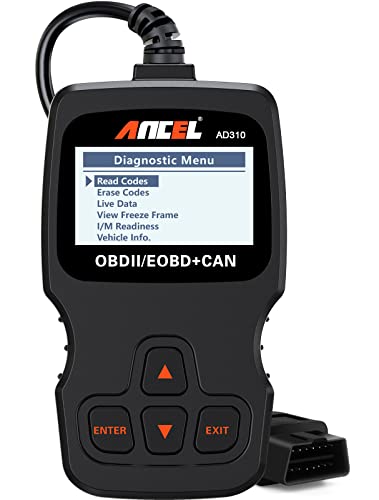
One rung higher, this ANCEL adds context around the code itself. Its listing describes live data, freeze frame information and I/M monitor readiness alongside reading and clearing, which helps you judge whether a fault is current and whether the car is ready for an emissions check. The wired handheld format keeps everything on its own screen, with no phone or pairing step involved. It suits owners of a single everyday car who want a little more evidence than a bare code number, without moving into app-based tools or multi-system scanners.
Specs
- Connection: wired handheld with a 2.5-foot cable
- Display: 2.4-inch screen, 128 x 64 resolution, from the listing details
- Protocols listed: KWP2000, J1850 VPW, ISO9141, J1850 PWM and CAN
- Functions listed: read and clear codes, live data, freeze frame and I/M readiness
- Power: supplied through the vehicle OBD2 port
Best for: Owners who want live data and readiness checks on a self-contained wired reader.
Watch out for: The listing is clear that this is an engine scanner without reset functions, and it does not cover ABS or transmission systems.
ASIN: B01G5EA74I
FOXWELL NT301 OBD2 Scanner

Graphing changes what live data can show you. Instead of watching numbers flicker, this FOXWELL plots a sensor trace on its colour screen, so a lazy oxygen sensor or an unstable reading becomes visible as a shape. Its listing also highlights an I/M readiness hotkey with a red-yellow-green indicator, aimed at a quick judgement before an emissions test. The tool stays wired and vehicle-powered, so there is nothing to charge between uses. Choose it when engine diagnosis is your whole task but you want to reason from patterns rather than from a single code definition.
Specs
- Connection: wired, powered directly by the vehicle
- Display: 2.8-inch colour screen
- Functions listed: read and clear diagnostic trouble codes, view live data streams and graph live sensor data
- Readiness: I/M readiness hotkeys with red-yellow-green LED indicator
- Updates: lifetime updates stated in the listing, via a computer connection
- Vehicle information: retrieves the vehicle VIN
Best for: Home mechanics who diagnose engine faults from graphed live data.
Watch out for: Coverage is engine-focused; the listing does not offer ABS or SRS scanning, and update support is stated for Windows rather than Mac.
ASIN: B00UJV3E12
BlueDriver Bluetooth Pro OBDII Scan Tool

This is the tier where the scanner stops being engine-only. BlueDriver is a small Bluetooth sensor with no screen, and its listing names check engine, ABS, SRS and airbag diagnosis among more than seven thousand issues on vehicles from 1996 onward. The companion app for iPhone and Android produces a vehicle-specific repair report for a code, which turns a dashboard warning into a document you can keep or share with a workshop. It suits drivers comfortable working through a phone who want broader system coverage without carrying a larger handheld unit.
Specs
- Connection: Bluetooth to the BlueDriver app on iPhone and Android
- Systems named in the title: check engine, ABS, SRS and airbag
- Coverage stated in the title: 7000+ issues on vehicles 1996 and newer
- Model: LSB2, from Lemur Vehicle Monitors
- Subscription: the listing states no subscription fee for the core functions
Best for: Phone-first drivers who need ABS and airbag codes plus a written repair report.
Watch out for: The sensor does nothing without the app and a compatible phone, and deeper system coverage depends on the vehicle, so check your model first.
ASIN: B00652G4TS
Innova 5610 OBD2 Bidirectional Scan Tool

The top tier here adds two things the lower rungs cannot offer: commands sent to the car, and reset procedures that close out a repair. Innova describes bidirectional tests alongside enhanced live data for engine, transmission, ABS and SRS, plus special reset functions, with updates included and no subscription mentioned in the listing. Examples given for this class of tool include operating a fuel pump or retracting an electronic parking brake on supported vehicles. It fits experienced home mechanics whose work already includes brake jobs and component testing, not just code reading.
Specs
- Connection: wired handheld scan tool
- Functions listed: active and bi-directional system tests, all system network scan
- Systems listed: enhanced data stream for engine, AT, ABS and SRS
- Special features listed: oil light reset, EPB and ABS brake bleeding service, BMS and battery reset, SAS and DPF functions, TPMS reading
- Updates: updates included, per the listing title
- Weight and size listed: 1.3 pounds, 7 x 3.75 x 1 inches
Best for: Experienced DIY mechanics who run component tests and service resets.
Watch out for: Bidirectional and reset coverage applies to select makes and models only, so use the maker coverage checker for your exact vehicle before buying.
ASIN: B07Z481NJM
Which One Fits Your Situation
The Light Came On and You Just Want to Know Why
Start with the MOTOPOWER MP69033 or the ANCEL AD310. Both answer the immediate question on a wired tool that lives in the car, and the ANCEL adds freeze frame and readiness information if you want context around the code. There is little sense paying for brake system access or bidirectional commands when a single unexplained warning light is the whole problem you are trying to solve today.
You Maintain One Family Car and Do Your Own Servicing
The FOXWELL NT301 matches this pattern well. Graphed live data helps you confirm a sensor is genuinely failing before you replace it, and the readiness indicator tells you where the car stands before an emissions appointment. Everything runs on the tool itself, so servicing does not depend on whose phone is charged or which app account is signed in when the work needs doing.
Several Warning Lights, Not Just the Engine Light
Choose the BlueDriver when brake or airbag warnings join the check-engine light. Its listing covers those systems on supported vehicles, and the repair report gives you a structured starting point for a conversation with a workshop. Keep in mind that the phone is the interface, so this route works best for the person whose handset will always be present when the car needs scanning.
You Already Do Brake Work and Component Testing
The Innova 5610 is the pick in this guide built for that workload. Bidirectional tests and listed reset functions support the repair itself rather than stopping at diagnosis, and updates are included according to the listing. Because those advanced functions vary by vehicle, confirm your exact year and model in the maker coverage information before treating any single test or reset as guaranteed.
Common Mistakes
- Buying by headline function count instead of checking which systems the tool actually reads on your vehicle.
- Assuming every scanner clears a warning light permanently, when a returning code usually means the underlying fault is still present.
- Ignoring the update path and discovering later that the tool needs a computer operating system your household does not use.
- Choosing a Bluetooth adapter for a shared family car, then finding the paired phone is not available when someone else needs a scan.
- Paying for reset and bidirectional tiers before you own the other tools and skills those repair jobs require.
Frequently Asked Questions
Does a higher tier always diagnose a fault better?
Not necessarily. Higher tiers read more systems and add tests or resets, but for a straightforward engine code the information from a basic reader and a flagship tool can be identical. The extra capability only matters when your fault lives in another module, when you need live data to interpret the code, or when a repair finishes with a reset procedure the simpler tool cannot perform.
Can these scanners tell me exactly which part to replace?
No scanner in this guide names a failed part with certainty. A code identifies the circuit or test that reported a problem, and live data, freeze frame information and reports narrow the possibilities further. Wiring faults, weak connections and related sensors can all sit behind the same code, so treat the reading as the start of diagnosis rather than as a shopping instruction for one specific component.
Will an engine-only reader work for an airbag or brake warning?
No. Airbag and brake faults are stored in separate modules, and an engine-only reader cannot retrieve them. If those lights are your concern, choose a tool whose listing explicitly names ABS or SRS coverage, like the BlueDriver or the Innova 5610 here, and then confirm that the coverage applies to your vehicle, because supported systems differ between makes and model years.
What should I check before ordering any of these tools?
Confirm three things on the listing and the maker information. First, that your vehicle uses the standard OBD II connection the tool expects. Second, that the systems and functions you care about are listed for your make, model and year, especially resets and bidirectional tests. Third, how updates are delivered and whether your phone or computer meets that requirement, so the tool stays current after purchase.
Related guides
More from Amazon
Programs that pair well with the guide above. Offers and eligibility are set by Amazon and may change.
Free shipping on eligible items, Prime Video and more. Eligible new members can start with a free trial.
Start a Prime free trialAudiobooks and podcasts to listen to on the go. Eligible new members can start with a free trial.
Try Audible freeAd-free music streaming. Eligible new subscribers can start with a free trial.
Try Music Unlimited freeA free business account with business pricing and bulk-buying tools for work, shop or home office.
Create a business accountAs an Amazon Associate we earn from qualifying purchases.
Write Your Review
No reviews yet. Be the first to share your experience!