
Key takeaways
- Four balanced desktop DACs with USB inputs and XLR line outputs, compared for nearfield monitors and desk systems using specs from the Amazon listings.
What's inside
As an Amazon Associate I earn from qualifying purchases. This post may contain affiliate links at no extra cost to you.
The decision that matters here is not which DAC chip a box uses, but whether its balanced outputs are true line outputs. Plenty of desktop units advertise balanced connections that turn out to be headphone sockets, which cannot feed powered monitors or a power amplifier properly. For a nearfield desk system, you need balanced XLR line outputs on the back panel, a USB input your computer sees without fuss, and a clear answer to who controls the volume once everything is connected.
This guide is for listeners building or upgrading desktop audio: nearfield powered monitors on a work desk, a compact stereo beside the computer, or a combined headphone-and-speaker setup. Every pick is a desktop DAC sold on Amazon US whose listing publishes balanced line outputs and a USB input, and every specification below is taken from the product names and details on those Amazon listings.
Quick Picks
As an Amazon Associate we earn from qualifying purchases
| Product | Best for | Key spec from title |
|---|---|---|
| SMSL SU-9n | Feeding powered monitors from a PC, no headphones needed | ES9038PRO chip with DSD512 over USB |
| Schiit Modius E | A simple balanced DAC tucked under a monitor stand | Unison USB input, balanced output stages |
| SMSL DO100 Pro | A desk that mixes a PC with a TV or console | Dual ES9039Q2M with HDMI ARC input |
| SMSL RAW-MDA1 | One box for headphones and powered speakers | Dual ES9039Q2M, MQA, remote control |
How to Choose
Balanced line outputs are not balanced headphone jacks
A balanced headphone socket and a balanced line output solve different problems. The 4.4 mm and 4-pin XLR jacks on the front of DAC-amp combos are powered headphone outputs, with levels and impedances meant for earpieces, not for the line inputs of powered monitors. What a monitor-focused DAC needs is a balanced analog line output, almost always a pair of 3-pin XLR sockets on the rear panel, published in the listing as a line or preamp output. Before ordering, find the rear-panel photo or output list on the product page and confirm the XLR pair is described as a line output, not a headphone connection.
Decide who controls the volume before you connect anything
Powered monitors often have awkward rear-panel volume knobs, or none at all, so the DAC’s output mode matters daily. A variable or preamp mode lets the DAC set listening level, which suits monitors used on their own. A fixed mode sends a full, steady line level and suits systems where an amplifier or the monitors themselves handle volume. The SU-9n publishes both modes with different output levels for each, while the Modius E has no volume control at all. Pick the arrangement that matches your speakers, because running a fixed full-level output into monitors with no volume control leaves you with no safe way to turn down.
Check the USB input’s format ceiling and driver needs
Every pick here takes USB, but the listings differ in what that input can carry. XMOS-based designs such as the SU-9n and RAW-MDA1 publish PCM up to 768 kHz and native DSD512, while Schiit’s Unison USB takes a simpler plug-and-play route aimed at ordinary computer sources. High sample rates and native DSD on Windows can require a maker-supplied driver, while macOS and Linux usually work through the standard USB audio class. Consoles are stricter still and may need a USB 1.1 compatibility mode. Match the listing’s stated rates and modes to the files and sources you actually use, rather than paying for headroom you will never touch.
Count the extra inputs your desk will really use
A USB-only shortlist would miss how desks actually work. The computer is one source among several: a TV over the workbench, a game console, a phone. Optical and coaxial inputs cover most of those, the DO100 Pro adds HDMI ARC so a television can feed the same monitors the PC uses, and Bluetooth with LDAC turns any of these DACs into a wireless endpoint for a phone. Each extra input removes a separate box or a cable swap from the desk. List your sources first, then choose the DAC whose published input set covers all of them.
The 4 Best Options
SMSL SU-9n
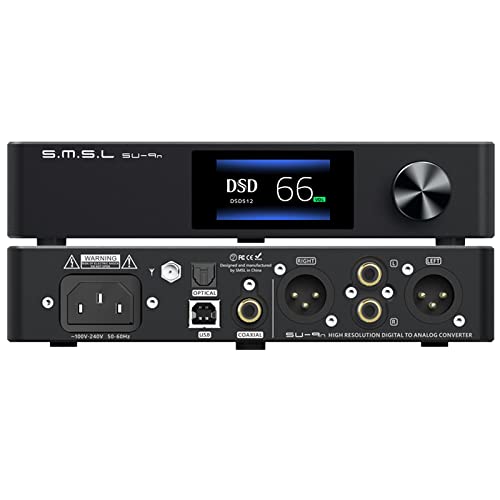
If your desk system is a pair of powered monitors or a separate amplifier and headphones never enter the picture, the SU-9n is the cleanest fit in this group. Its listing pairs the flagship ES9038PRO converter with balanced XLR outputs rated at 130 dB dynamic range, and it offers both a variable pre mode and a fixed mode for systems that handle volume elsewhere. Bluetooth with LDAC covers phone listening, while the XMOS USB input handles the computer side up to DSD512.
Specs
- DAC chip: ESS ES9038PRO with ES9311 low-noise power supply chip
- USB input: XMOS XU208, asynchronous
- Sampling rates: PCM 44.1-768 kHz and DSD up to DSD512 over USB; PCM up to 192 kHz over optical and coaxial
- Inputs: USB, optical, coaxial, Bluetooth 5.0 (LDAC, aptX-HD)
- Outputs: balanced XLR and RCA line outputs
- Output level: XLR 4.8 Vrms / RCA 2.3 Vrms in pre mode; XLR 4.3 Vrms / RCA 2.0 Vrms in fixed mode
- THD+N: 0.000065%
- Dynamic range: 130 dB (XLR), 123 dB (RCA)
- Remote control included
Best for: Listeners running powered monitors or a power amp straight from the DAC, with no headphone duty.
Watch out for: There is no headphone output at all, so headphones need a separate amplifier; confirm the output mode before first use, because fixed mode sends a full-level signal to powered monitors.
ASIN: B09JC6BQ21
Schiit Modius E

The Modius E takes the opposite route from the feature-packed SMSL boxes: no screen, no Bluetooth, no remote and no headphone socket, just a converter with balanced outputs. Schiit’s listing highlights its Unison USB interface, designed in-house for plug-and-play use with computers and streamers, feeding an ESS ES9028 chip and dedicated balanced and single-ended output stages. For a nearfield desk where the DAC sits under a monitor and simply feeds powered speakers through an amplifier or the speakers’ own volume controls, that simplicity is the point.
Specs
- DAC chip: ESS ES9028
- USB input: Schiit Unison USB interface, plug-and-play with modern devices
- Analog outputs: balanced XLR and single-ended RCA, with dedicated DC-coupled output stages
- Sources named in the listing: computer, streamer, tablet, TV and CD player
Best for: A set-and-forget balanced source for powered monitors or a separate amp in a computer-first desk system.
Watch out for: There is no volume control, remote or Bluetooth, so your monitors or amplifier must handle volume; this ASIN is the silver finish, and the black finish is sold under a separate listing.
ASIN: B0B36QGLWR
SMSL DO100 Pro

The DO100 Pro is the pick when the desk doubles as a small entertainment setup. Alongside the expected USB input, its listing adds an HDMI ARC input for a TV, Bluetooth 5.1 for phones, and optical and coaxial for consoles or disc players, all converted by a pair of ES9039Q2M chips. The XLR outputs publish a 131 dB signal-to-noise ratio, and RCA and XLR can run at the same time, so powered monitors and a subwoofer-equipped amplifier do not have to fight over one output.
Specs
- DAC chips: 2 x ESS ES9039Q2M
- USB input: XMOS XU316; PCM up to 768 kHz, DSD512, MQA decoding
- Inputs: USB, optical, coaxial, HDMI ARC, Bluetooth 5.1 (LDAC, via Qualcomm QCC5125)
- Outputs: RCA and XLR line outputs, usable simultaneously
- Signal-to-noise ratio: 131 dB (XLR), 127 dB (RCA)
- THD+N: less than 0.00005%
Best for: Desk systems that mix a computer with a TV or console and still need balanced feeds to powered monitors.
Watch out for: It is a DAC and preamp only, with no headphone output; HDMI ARC behavior such as TV-remote volume control varies by television.
ASIN: B0CZ8YZH65
SMSL RAW-MDA1

The RAW-MDA1 is the one-box answer for desks that split time between headphones and speakers. Behind its color display sit two ES9039Q2M converters, an XMOS XU-316 USB input and a built-in headphone amplifier, while the back panel carries the balanced XLR line outputs this guide is about, published at 5.2 Vrms with 132 dB dynamic range. Doubled coaxial and optical inputs, Bluetooth with LDAC and a remote control make it easy to leave a PC, a console and a phone connected at once.
Specs
- DAC chips: dual ESS ES9039Q2M
- USB input: XMOS XU-316; PCM up to 768 kHz/32-bit and DSD512; MQA and MQA-CD decoding
- Inputs: USB, optical, coaxial, Bluetooth (LDAC, aptX HD)
- Line outputs: XLR at 5.2 Vrms and RCA at 2.5 Vrms
- Dynamic range: 132 dB (XLR), 127 dB (RCA)
- THD+N: 0.00005%
- Headphone output: up to 2.5 W x 2 at 16 ohms
- Remote control included
Best for: One desktop unit that drives headphones directly and still feeds powered monitors over balanced XLR.
Watch out for: The front 4.4 mm socket is a headphone output, not a line out, so monitors belong on the rear XLR pair; check the USB mode setting when connecting a game console.
ASIN: B0DFCFHQ2W
Which One Fits Your Situation
Powered monitors are the whole system
Choose the SMSL SU-9n. Its variable pre mode lets the DAC itself control listening level into active speakers, its fixed mode suits monitors with their own controls, and the published 130 dB dynamic range on the XLR outputs is the strongest figure in this group. You give up headphones entirely, so this pick assumes speakers are the only destination.
Headphones and speakers share one desk
Choose the SMSL RAW-MDA1. It is the only pick here that combines balanced XLR line outputs for powered monitors with a proper built-in headphone amplifier, and its remote control, color display and doubled digital inputs suit a desk that switches between sources all day. The SU-9n measures cleaner on paper, but it cannot drive a headphone at all.
A television or console feeds the same monitors
Choose the SMSL DO100 Pro. Its HDMI ARC input lets a TV send sound to the same powered monitors your computer uses, optical and coaxial cover consoles and disc players, and the RCA and XLR outputs can run simultaneously for a second amplifier or subwoofer path. No other pick here publishes an ARC input.
You want the fewest features that can go wrong
Choose the Schiit Modius E. There is no display to configure, no Bluetooth to pair, no firmware-driven feature set and no volume control to mis-set; the listing’s pitch is a converter with balanced outputs and a USB input that works with nearly any source. Your amplifier or monitors must provide the volume control, and in exchange the signal path stays as simple as desktop audio gets.
Common Mistakes
- Treating a balanced headphone jack as a balanced line output and trying to feed powered monitors from the front panel of a DAC-amp.
- Leaving a DAC in fixed, full-level output mode while it is connected to powered monitors that have no accessible volume control.
- Using RCA-to-XLR adapter cables and expecting balanced noise rejection; the run is only balanced if the source output, cable and receiving input are all balanced.
- Assuming every DAC with “balanced” in its title has balanced line outputs, without checking the rear-panel output list on the product page.
- Ignoring the USB audio mode a game console needs, then finding the new DAC only works with the computer it was bought for.
Frequently Asked Questions
Do balanced outputs improve sound on short desktop cable runs?
Over the short runs on a desk, balanced cabling rarely changes tonal quality, but it does reject interference picked up along the cable and breaks ground loops between a computer and powered monitors, a common source of buzz and whine that follows mouse movement. It also usually provides a higher output level, which suits professional monitor inputs.
Can I connect powered monitors directly to these DACs?
Yes, provided you manage volume correctly. Models with a variable or preamp output mode, such as the SU-9n, DO100 Pro and RAW-MDA1, can set listening level themselves. A fixed-output arrangement, or the volume-control-free Modius E, needs monitors with their own volume controls or an amplifier between the DAC and the speakers.
Is a 4.4 mm balanced output the same as a balanced line output?
No. On desktop DAC-amps the 4.4 mm socket is a balanced headphone output, designed to drive earpieces at headphone levels and impedances. A balanced line output is a separate, line-level connection, usually a pair of rear-panel XLR sockets, intended for powered monitors and amplifiers. An adapter cable does not turn one into the other.
Will these DACs work with a game console over USB?
Some will, with a caveat. Consoles generally require the older USB Audio Class 1 mode, and several desktop DACs provide a switchable 1.1 mode for exactly this; the DO100 Pro’s listing names the PS5 and Switch among supported devices. Check the listing for a USB mode note before assuming a console will recognize the DAC.
Related guides
More from Amazon
Programs that pair well with the guide above. Offers and eligibility are set by Amazon and may change.
Free shipping on eligible items, Prime Video and more. Eligible new members can start with a free trial.
Start a Prime free trialAudiobooks and podcasts to listen to on the go. Eligible new members can start with a free trial.
Try Audible freeAd-free music streaming. Eligible new subscribers can start with a free trial.
Try Music Unlimited freeA free business account with business pricing and bulk-buying tools for work, shop or home office.
Create a business accountAs an Amazon Associate we earn from qualifying purchases.










Write Your Review
No reviews yet. Be the first to share your experience!