
Key takeaways
- Compare the best USB oscilloscopes for product development, from a four-channel PicoScope to compact Hantek and Owon models for embedded work.
What's inside
As an Amazon Associate I earn from qualifying purchases. This post may contain affiliate links at no extra cost to you.
Product development work rarely stays on one signal for long. A board that powers up cleanly can still hide a slow reset line, a noisy rail, or a serial bus that only misbehaves under load, and the scope you choose decides how many of those signals you can watch at once, how long a capture you can keep, and whether the instrument fits the bench where the prototype actually sits.
This guide is for embedded developers, hardware engineers bringing up new boards, and small product teams who need a USB scope that lives beside a laptop rather than a full bench instrument. Every product below was chosen from the names and specifications printed on its Amazon product page, and every model connects to a computer over USB.
Quick Picks
As an Amazon Associate we earn from qualifying purchases.
| Product | Best for | Key spec from title |
|---|---|---|
| Pico Technology PicoScope 2405A | Watching four related signals during board bring-up | 4 Channels 25MHz |
| Pico Technology PicoScope 2204A | A low-cost second scope for a development seat | 2 Channel 10 MHz Bandwidth USB |
| Hantek 6022BE | Portable checks away from the main bench | 2 Channels 20MHz USB |
| Owon VDS1022I | Development work where USB isolation matters | MIT USB Isolation, 25 MHz |
How to Choose
Channel Count and Simultaneous Signals
Product development debugging is often a timing question rather than a single-waveform question. A reset line, a clock, a data line, and a power rail can each look correct alone while their relationship is wrong, so four channels let you see cause and effect in one capture instead of repeating the test. Two channels still suit many tasks, such as comparing an input against an output, but count the signals your current project needs to watch together before choosing, and leave room for the next board revision.
Bandwidth and Sample Rate for Your Signals
Bandwidth should comfortably cover the fastest edge you need to judge, not merely the clock frequency printed on a schematic, because fast edges contain higher-frequency content than the repetition rate suggests. Sample rate matters alongside it, since a capture taken too slowly can miss a narrow glitch or make a clean edge look distorted. Match both figures, as printed in each listing title and details, to the microcontroller, bus, and switching signals on your product, and avoid paying for headline speed that your probes and layout cannot support.
Capture Memory and Long Event Recording
Bring-up faults often happen once, at power-up, after a mode change, or during a rare bus transaction, so the length of waveform a scope can hold before and after a trigger shapes whether you catch the event at all. A larger buffer, described in a listing as memory or record length, keeps more of a long sequence at a useful sample rate. Check the exact figure for the variant you are buying, because similar model names can carry very different memory, and a short buffer fills quickly on slow events.
Isolation, Grounding, and Computer Connection
A USB scope shares a ground relationship with the computer it plugs into, which matters when the device under development is mains-referenced, battery powered, or connected to other bench equipment. An isolated USB model, such as the Owon listing below, changes that relationship and deserves attention for products involving power conversion. Also confirm the USB connection type, the host software your computer needs, and whether probes are included in the listed kit, because a scope without the right probes or cable cannot be used on arrival.
The 4 Best Options
Pico Technology PicoScope 2405A
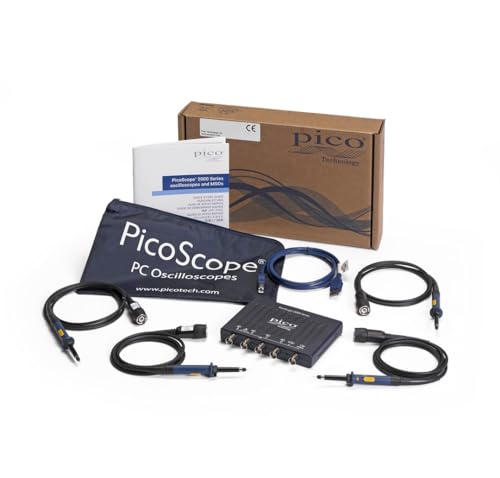
This four-channel PicoScope is the natural lead for product development because board bring-up so often involves watching several related signals together. Its listing describes a compact, USB-powered, handheld PC lab kit with probes, PS7 software, and a waveform generator, which suits a developer moving between a desk, a prototype bench, and a colleague’s workstation. The four channels support comparisons such as a supply rail against a reset release, while the included probes mean the kit is presented as ready to connect rather than as a bare instrument needing separate front-end accessories.
Specs
- Brand: Pico Technology
- Model: PicoScope 2405A
- Channels: 4 channels
- Bandwidth: 25 MHz
- Memory: 48 kS
- Included components: PicoScope 2405A 4 channel 25MHz USB oscilloscope
- Kit contents described in title: probes, PS7 software, and waveform generator
Best for: Development teams that need four channels for board bring-up and timing comparisons.
Watch out for: Confirm the 25 MHz bandwidth and 48 kS memory fit your fastest signals and longest captures before ordering.
ASIN: B01F9504WY
Pico Technology PicoScope 2204A

The 2204A gives a development seat a simpler two-channel PicoScope for everyday checks that do not justify tying up a larger instrument. Its listing describes a compact, USB-powered oscilloscope with two channels, which fits routine work such as confirming a clock is running, checking a pulse-width modulation output, or comparing a sensor signal against a trigger. Because the kit listing specifies probes are included, it can serve as a spare scope for a second engineer, a test fixture, or a field laptop bag where a basic, known instrument is more useful than extra channels.
Specs
- Brand: Pico Technology
- Model: PicoScope 2204A
- Channels: 2 channel
- Bandwidth: 10 MHz
- Sampling rate: 100 MS/s
- Capture memory: 8 kS
- Kit includes: two probes, USB cable, and Quick Start Guide
Best for: A second development seat or test fixture handling slower, routine signals.
Watch out for: The listing also exists in a version without probes, so confirm this exact listing includes probes before buying.
ASIN: B00GZMRZ3M
Hantek 6022BE

The 6022BE is the portable option in this group, described in its listing as a PC based digital oscilloscope with two channels and USB connection. For product development, that profile suits quick checks on a prototype away from the main bench, supplier visits, or a laptop-based setup where the scope travels with the board. Its lower bandwidth makes the buyer’s signal list decisive: it is aimed at slower embedded, control, and audio-range work rather than fast digital edges. Treat it as a focused travel and secondary instrument, and check the listing details for exactly what the portable kit contains.
Specs
- Brand: Hantek
- Model: 6022BE
- Type: Digital oscilloscope, portable PC based
- Channels: 2 channels
- Bandwidth: 20 MHz
- Connection: USB oscilloscope
Best for: Developers who need a compact USB scope for travel, fixtures, and slower prototype signals.
Watch out for: Check the host computer software requirements in the listing, and confirm 20 MHz covers your fastest edge.
ASIN: B0728HBNDV
Owon VDS1022I

The VDS1022I stands out in its listing for MIT USB isolation alongside a 25 MHz bandwidth, a combination that speaks directly to development work on products connected to power stages or other equipment. Isolation does not remove the need for correct probing technique or voltage limits, but it changes the USB ground relationship that otherwise links a prototype to the host computer. That makes this model worth close attention for power-related development, while its PC oscilloscope format keeps the display and storage on the computer rather than in a separate bench box with its own screen.
Specs
- Brand: Owon
- Model: VDS1022I
- Item model number: 01VDS1022I
- Type: USB PC oscilloscope
- Bandwidth: 25 MHz
- Feature named in title: MIT USB isolation
Best for: Product developers working near power circuitry who want a USB-isolated PC scope.
Watch out for: Verify the isolation and maximum input limits for your exact circuit in the listing before connecting it.
ASIN: B07PRT5WMJ
Which One Fits Your Situation
You Are Bringing Up a New Board
Choose the PicoScope 2405A when several signals must be understood together during first power-up and early firmware work. Its four channels, as printed in the listing, let you relate power, reset, clock, and data behavior in one capture instead of inferring timing across repeated tests. That relationship view is often where a development fault becomes visible, especially when a board works intermittently and each individual waveform looks plausible on its own.
You Need a Spare Scope for a Fixture or Second Seat
Choose the PicoScope 2204A when the job is a repeated, known check rather than open-ended debugging. A production-development fixture, a second engineer’s desk, or a laptop kit for supplier visits can all use a simpler two-channel instrument with probes included in the listing. Its lower bandwidth is a deliberate trade: it keeps the main scope free while covering slower clocks, control signals, and routine comparisons that dominate fixture work.
You Develop Products With Power Stages
Choose the Owon VDS1022I when the USB connection to the host computer is part of your safety and grounding calculation. Its listing names USB isolation and 25 MHz bandwidth, which makes it the relevant pick for prototypes involving power conversion or equipment referenced to different grounds. Still confirm the listed input and isolation limits against your circuit, because isolation is a specification to match, not a general guarantee for every connection.
You Mostly Check Slower Signals Away From the Bench
Choose the Hantek 6022BE when portability matters more than channel count or bandwidth headroom. Its listing presents a portable, PC based two-channel USB oscilloscope at 20 MHz, which suits slower embedded and control signals during travel or at a temporary test position. If your development work later moves to faster buses or longer captures, plan to step up to a deeper, wider model rather than expecting this compact scope to cover every board.
Common Mistakes
- Buying by bandwidth alone and ignoring capture memory, so a rare power-up fault falls outside the recorded window.
- Choosing two channels for a timing problem that really involves a rail, a reset line, a clock, and a data line at once.
- Assuming every listing of the same model includes probes, when some variants are sold without them.
- Plugging a non-isolated USB scope into a power prototype without thinking through the ground path through the host computer.
- Forgetting to check host software and USB connection requirements against the laptop the scope will actually travel with.
Frequently Asked Questions
How many channels does a product development scope need?
Four channels help when a fault depends on the relationship between power, reset, clock, and data signals, because all four can be captured together. Two channels are enough for many input-versus-output comparisons and routine checks. Count the signals in your current bring-up problem, then choose the smallest channel count that shows their timing relationship in a single capture.
Does USB isolation matter for prototype work?
It can matter when the prototype involves power conversion, mains-referenced circuitry, or several grounded instruments connected at once, because a normal USB scope links the circuit ground to the host computer. An isolated model changes that path, but its listed voltage and isolation limits still have to match your circuit. Treat isolation as a specification to verify, not as permission to probe anything.
Can a USB oscilloscope replace a bench oscilloscope for development?
For many embedded and lower-frequency development tasks, yes, provided its bandwidth, sample rate, memory, and channel count match the signals involved. A bench instrument may still suit very fast edges, high-voltage work, or teams that need a dedicated screen and controls. The practical test is your signal list: if the USB model’s printed specifications cover it with headroom, the format itself is not the limitation.
What should I check before ordering a specific listing?
Confirm the exact model name, channel count, bandwidth, memory figure, included probes, USB cable, and host software named in that listing, because similar model names and kit variants differ. Check whether probes are included or sold separately, and verify any isolation or input limit your circuit depends on. That listing-level check prevents the common problem of receiving a capable scope in the wrong kit configuration.
Related guides
More from Amazon
Programs that pair well with the guide above. Offers and eligibility are set by Amazon and may change.
Free shipping on eligible items, Prime Video and more. Eligible new members can start with a free trial.
Start a Prime free trialAudiobooks and podcasts to listen to on the go. Eligible new members can start with a free trial.
Try Audible freeAd-free music streaming. Eligible new subscribers can start with a free trial.
Try Music Unlimited freeA free business account with business pricing and bulk-buying tools for work, shop or home office.
Create a business accountAs an Amazon Associate we earn from qualifying purchases.










Write Your Review
No reviews yet. Be the first to share your experience!