
Key takeaways
- Find the best embroidery machine for beginners under 500 with simple controls, built-in designs, a 4 by 4 hoop, and design transfer for first projects.
What's inside
As an Amazon Associate I earn from qualifying purchases. This post may contain affiliate links at no extra cost to you.
The best embroidery machine for beginners under 500 is one that keeps the first steps simple: a clear touchscreen, a set of built-in designs, an automatic needle threader, and a hoop size that suits small projects. A beginner does not need a commercial multi-needle machine or a huge embroidery field. What matters most is a machine that stays forgiving while you learn to hoop fabric, choose stabilizer, and change thread colors without frustration.
This guide covers three beginner-friendly Brother embroidery machines that fit a five hundred budget frame: the Brother PE545, the Brother SE700, and the Brother PE535. All three are single-needle machines with a 4 by 4 inch embroidery field, the standard starting size for monograms, small motifs, patches, and personalized gifts.
What to Look For in a Beginner Embroidery Machine Under 500
The points below make the biggest difference during the first few months of learning.
Embroidery field size. The field is the largest area a machine can stitch in one hooping. All three machines here stitch a 4 by 4 inch field, which handles names, initials, small flowers, baby clothes, towel borders, and pocket designs.
Built-in designs and lettering fonts. Built-in designs let you stitch something on the very first day, before you learn to download design files. The machines below include between 80 and 135 built-in designs and between 9 and 10 lettering fonts, for plenty of variety.
Touchscreen and on-screen editing. A color LCD touchscreen changes the whole experience. The PE545 and the SE700 both use a 3.7 inch color LCD touchscreen, while the PE535 uses a smaller 3.2 inch color LCD touchscreen.
Design transfer: USB and wireless. A USB port lets you load design files from a computer on a flash drive. The PE545 and the SE700 also include wireless LAN, so designs can be sent through the Artspira app and Brother Design Database Transfer software without a cable.
Automatic needle threader and thread cutter. Threading a needle by hand is one of the most tiring parts of embroidery. An automatic needle threading system feeds the thread through the needle eye for you, and an automatic thread cutter trims the thread at the end of each color section. All three machines in this guide include both features.
Speed and thread sensors. Maximum embroidery speed is listed in stitches per minute. The PE545 and the PE535 both stitch at up to 400 stitches per minute, a comfortable pace for a beginner. The PE545 also includes bobbin and upper thread sensors that stop the machine when a thread runs out, instead of stitching empty air.
Sewing plus embroidery, or embroidery only. Two of the machines below embroider only, while the SE700 also sews. A combination machine is a good pick if you want one machine that handles both regular sewing and embroidery. An embroidery-only machine is a good pick if you already own a sewing machine and want a dedicated embroidery unit.
Weight, size, and storage. The PE545 and the SE700 share the same body, measuring 7.76 by 16.50 by 12.09 inches, and the PE545 weighs 14.07 pounds. The PE535 is a similar size at about 7.75 by 16.5 by 12.08 inches. Keep the machine on a stable table with room for the hoop to move freely.
Three Beginner Embroidery Machines Worth a Closer Look
The three machines below share a 4 by 4 inch embroidery field but differ in useful ways: the PE545 is the modern embroidery-only pick with wireless transfer, the SE700 adds sewing capability, and the PE535 is the simpler embroidery-only pick with a smaller screen and library.
1. Brother PE545 Embroidery Machine
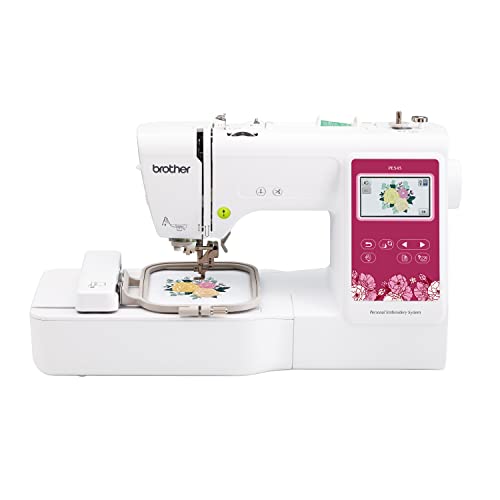
The Brother PE545 is a single-needle, embroidery-only machine built for beginners who want a gentle start and a modern feature set, with a 3.7 inch color LCD touchscreen and wireless design transfer.
- Amazon link: https://www.amazon.com/dp/B0B8DSJKTH
Key specifications from the listing and the manufacturer include 135 built-in embroidery designs plus 10 built-in lettering fonts. The maximum embroidery area is 4 by 4 inches, and the machine stitches at up to 400 stitches per minute. The 3.7 inch color LCD touchscreen supports on-screen editing and drag-and-drop positioning. Designs load through the USB port or over wireless LAN using the Artspira app and Design Database Transfer software. The machine includes an advanced needle threading system, an automatic thread cutter, a Quick-Set bobbin, and bobbin and upper thread sensors. It measures 7.76 by 16.50 by 12.09 inches, weighs 14.07 pounds, and carries a 1, 2, and 25-year limited warranty.
The PE545 suits a beginner who wants embroidery only and does not need a sewing machine in the same unit. The touchscreen view helps you catch placement mistakes before the needle moves, and the thread sensors stop the machine when thread runs out, which protects both the fabric and the design. Wireless transfer sends designs from a phone instead of a flash drive.
Considerations: the 4 by 4 inch field limits every design to a small square, so larger motifs must be split across multiple hoopings or resized to fit. The machine does not sew, so you will still need a separate sewing machine for seams, hems, and construction. The built-in designs lean toward simple motifs and alphabets.
2. Brother SE700 Sewing and Embroidery Machine

The Brother SE700 is a computerized sewing and embroidery combination machine. Its embroidery side matches the PE545, with the same 135 built-in designs, the same 4 by 4 inch field, and the same 3.7 inch color touchscreen, while the sewing side adds 103 built-in sewing stitches and 8 included presser feet.
- Amazon link: https://www.amazon.com/dp/B0B8DYP1RN
Key specifications from the listing include 135 built-in embroidery designs, 103 built-in sewing stitches, a 4 by 4 inch embroidery hoop area, and a 3.7 inch color touchscreen display. The machine is computerized and connects over wireless LAN, with a USB port for design transfer and support for the Artspira app. It ships with 8 included feet. It shares the PE545 body size and the same 1, 2, and 25-year limited warranty. The SE700 also includes an advanced needle threading system and an automatic thread cutter.
The SE700 suits a beginner who wants one machine for both crafts: sew a tote bag, then embroider a name on it, without switching machines or moving to a different table. The 103 sewing stitches cover straight stitching, zigzag, decorative stitches, and buttonholes.
Considerations: a combination machine has more menus and more settings to learn, because the sewing and embroidery functions share one screen and one set of controls. The embroidery field is still 4 by 4 inches, so the SE700 does not stitch larger designs than the PE545. Brother does not list a maximum embroidery speed for the SE700.
3. Brother PE535 Embroidery Machine

The Brother PE535 is a single-needle, embroidery-only machine with a smaller built-in library and a smaller screen than the PE545, which makes it the simplest of the three machines in this guide. Its controls are straightforward for a first-time user.
- Amazon link: https://www.amazon.com/dp/B07CCKSX2X
Key specifications from the listing include 80 built-in embroidery designs, 9 built-in lettering fonts, and 10 built-in frame patterns, with a maximum embroidery area of 4 by 4 inches. The machine uses a 3.2 inch color LCD touchscreen, stitches at up to 400 stitches per minute, and loads designs through a USB port. It includes an automatic needle threader, an automatic thread cutter, and a Quick-Set top drop-in bobbin system. The body measures about 7.75 by 16.5 by 12.08 inches, and it carries a 25-year limited warranty. On-screen tutorials help a beginner through the first setup steps.
The PE535 suits a beginner who wants the simplest possible embroidery machine and does not need wireless transfer or a large built-in library. With 80 designs, 9 fonts, and 10 frames, it still covers monograms, names, small motifs, and gift personalization, and the USB port makes it easy to add designs from a computer when you are ready.
Considerations: the PE535 is discontinued by Brother, so new units come from retailer stock rather than current production, and availability should be checked on the live Amazon listing before ordering. Every design must arrive through the USB port, since it has no wireless LAN. The built-in library is smaller than the PE545 and the SE700, with 80 designs instead of 135 and a smaller screen than the other two machines. It embroiders only.
Side-by-Side Comparison
| Feature | Brother PE545 | Brother SE700 | Brother PE535 |
|---|---|---|---|
| Machine type | Embroidery only | Sewing and embroidery combination | Embroidery only |
| Built-in embroidery designs | 135 | 135 | 80 |
| Lettering fonts | 10 | 10 | 9 |
| Embroidery field | 4 by 4 inches | 4 by 4 inches | 4 by 4 inches |
| Touchscreen | 3.7 inch color LCD | 3.7 inch color LCD | 3.2 inch color LCD |
| Design transfer | Wireless LAN and USB | Wireless LAN and USB | USB |
| Maximum embroidery speed | Up to 400 stitches per minute | Not listed by Brother | Up to 400 stitches per minute |
| Needle threading | Advanced needle threading system | Advanced needle threading system | Automatic needle threader |
| Thread cutter | Automatic | Automatic | Automatic |
| Built-in sewing stitches | None, embroidery only | 103 | None, embroidery only |
| Included feet | Embroidery foot Q | 8 included feet | Embroidery foot included |
| Dimensions | 7.76 by 16.50 by 12.09 inches | 7.76 by 16.50 by 12.09 inches | About 7.75 by 16.5 by 12.08 inches |
| Warranty | 1, 2, and 25-year limited | 1, 2, and 25-year limited | 25-year limited |
The three machines share the same field size and automatic threading and cutting; they differ in design library, screen size, wireless transfer, and sewing capability.
Choosing the Right Machine for Your First Projects
If your first projects are monogrammed towels, baby gifts, small patches, and personalized tote bags, any of the three machines will handle them: all three stitch the same 4 by 4 inch field at the same published speed.
Pick the Brother PE545 when you want the most modern embroidery-only experience in this group. The larger touchscreen, the 135 built-in designs, the wireless transfer, and the thread sensors make the learning curve gentler.
Pick the Brother SE700 when you want one machine that sews and embroiders. Its 103 sewing stitches and 8 included feet cover garment repairs, hems, and simple sewing projects as well as embroidery. It suits a beginner with limited space, or one unsure whether sewing or embroidery will become the main hobby.
Pick the Brother PE535 when you want the simplest machine of the three and you are comfortable loading designs through a USB port. Because Brother has discontinued this model, check the live Amazon listing for current availability before ordering.
Plan for the extras every beginner needs: embroidery thread in several colors, pre-wound bobbins, stabilizer in tear-away and cut-away types, embroidery needles, and extra hoops if you plan to stitch many items in a row. The wrong stabilizer ruins more first projects than any missing feature does.
Getting Started and Everyday Care
Take the first week slowly. Read the operation manual that comes in the box, and work through the on-screen tutorials before stitching on anything you care about. Start with a built-in design on a practice piece of cotton with a layer of tear-away stabilizer, and watch the first few color changes.
Hooping is the skill that takes the most practice. The fabric should be smooth and taut in the hoop, without being stretched out of shape. Use the right stabilizer for the fabric: tear-away stabilizer for stable woven cotton, cut-away stabilizer for stretchy knits and for items that will be washed often, and a water-soluble topper on towels and other fabrics with a raised pile. Change the needle regularly, and use embroidery needles and embroidery thread for the top thread.
Everyday care is simple but worth doing. Brush lint out of the bobbin area after each project, and follow the manual for oiling points and intervals. Keep the machine covered when it is not in use and store it in a dry room. When a design goes wrong, stop the machine, check the threading path and the bobbin, and re-hoop the fabric if it has shifted. Most beginner problems come from threading, hooping, or stabilizer, not from the machine itself.
Keep a folder on your computer for designs and name each file clearly. If you use the USB port, keep one flash drive for embroidery only, and check that your design files are in a format the machine reads.
Frequently Asked Questions
Is a 4 by 4 inch embroidery field big enough for a beginner?
Yes, for most first projects. A 4 by 4 inch field covers monograms, names, small motifs, pocket designs, patches, and towel borders, which are the projects most beginners start with.
Do I need a sewing machine as well as an embroidery machine?
It depends on the model you choose. The Brother SE700 sews and embroiders, so it works on its own for both kinds of work. The Brother PE545 and the Brother PE535 embroider only, so you will need a separate sewing machine for seams, hems, and garment construction.
How do I get new designs onto a beginner embroidery machine?
All three machines accept designs through a USB port: store the design file on a flash drive, plug the drive into the machine, and select the design on the touchscreen. The PE545 and the SE700 also support wireless LAN transfer through the Artspira app and Design Database Transfer software, so designs can be sent without a cable.
What supplies should a beginner buy with the first machine?
The essentials are embroidery thread in a few colors, pre-wound bobbins with white bobbin thread, tear-away and cut-away stabilizer, embroidery needles, small scissors for trimming jump threads, and a water-soluble topper for towels and textured fabrics. A second hoop lets you hoop the next piece while the machine stitches the current one.
How long does it take to learn machine embroidery?
Most beginners stitch a recognizable first design on the same day they set up the machine, using a built-in motif on practice fabric. Hooping neatly and choosing the right stabilizer take a few projects to learn, and lettering placement becomes natural after a handful of monogrammed items.
Conclusion
The best embroidery machine for beginners under 500 is the one that matches how you plan to use it: the Brother PE545 for a modern embroidery-only start, the Brother SE700 when you want sewing and embroidery in one machine, or the Brother PE535 for the simplest embroidery-only setup. All three share the same 4 by 4 inch field and automatic threading and cutting. Start small, practice on spare fabric, and let your first projects teach you what to make next.
Disclosure: As an Amazon Associate, we earn from qualifying purchases.
Related guides
More from Amazon
Programs that pair well with the guide above. Offers and eligibility are set by Amazon and may change.
Free shipping on eligible items, Prime Video and more. Eligible new members can start with a free trial.
Start a Prime free trialAudiobooks and podcasts to listen to on the go. Eligible new members can start with a free trial.
Try Audible freeAd-free music streaming. Eligible new subscribers can start with a free trial.
Try Music Unlimited freeA free business account with business pricing and bulk-buying tools for work, shop or home office.
Create a business accountAs an Amazon Associate we earn from qualifying purchases.










Write Your Review
No reviews yet. Be the first to share your experience!