
Key takeaways
- Compare four computerized embroidery machines for small business, from compact single-needle models to a ten-needle unit, by hoop size and workflow.
What's inside
As an Amazon Associate I earn from qualifying purchases. This post may contain affiliate links at no extra cost to you.
A small business owner choosing a computerized embroidery machine is really deciding how much of the working day will go to setup, colour changes, and rehooping, rather than to stitching paid orders. A machine that reads files from a computer, previews a design on a screen, and trims jump stitches on its own can turn a one-person operation into a steady production line. A machine without those functions leaves the owner doing the same fiddly work by hand, order after order, and that cost shows up long before the machine itself wears out.
This guide is for home-based embroiderers taking their first paid orders, small shops adding custom logos and names to garments, and owners who want one machine that can grow with a product range. Every machine below was chosen from the name and specifications shown on its Amazon listing, with attention to hoop size, design transfer, built-in designs, and the number of needles, because those four facts shape what a small business can actually sell.
Quick Picks
As an Amazon Associate we earn from qualifying purchases
| Product | Best for | Key spec from title |
|---|---|---|
| Brother PE900 | Embroidery-only orders with larger logos and names | 5 inch by 7 inch embroidery field, wireless LAN, 193 built-in designs |
| Brother SE700 | A small shop that also needs everyday sewing | 135 built-in designs, 103 built-in stitches, 4 inch by 4 inch hoop area |
| Poolin EOC06 | Large designs and a big on-screen workspace | 11 inch by 7.9 inch embroidery area, 7 inch touchscreen, 200 built-in designs |
| Smartstitch S-1001 | Multi-colour production with fewer thread changes | 10 needles, 1200 SPM max speed, 9.5 inch by 14.2 inch embroidery area |
How to Choose
Match the hoop to the work you will actually sell
Hoop size sets a hard ceiling on every design, because a logo larger than the field has to be split and rehooped, which adds alignment risk and time to each piece. A 4 inch by 4 inch field suits chest logos, pocket monograms, and small patches, while a 5 inch by 7 inch field opens up larger chest designs, towel borders, and quilt blocks. Machines with fields above 9 inches by 7 inches suit jacket backs, tote panels, and blanket corners. Before choosing, measure the largest design in the current order book and add room for stabilizer and hooping, then pick a field that covers it in one hooping.
Check how designs reach the machine
A computerized machine earns its name through the way it receives files, and the method matters when orders arrive as email attachments or downloads from a digitizer. A USB port accepts files directly from a computer and works without a network, which suits a workshop with patchy Wi-Fi. Wireless transfer lets an owner send a file from a phone or a computer in another room, and some machines pair that with a companion app for drawing or downloading patterns. Confirm the file formats the listing names, such as PES or DST, against the formats the digitizer supplies, because a mismatch means converting every file before stitching.
Count needles against colour changes
A single-needle machine stops at every colour change, so the owner rethreads by hand and watches the run, while a multi-needle machine holds several colours at once and changes between them automatically. For a run of twenty caps in three colours, that difference is measured in hours across a week. A single-needle machine is lighter, simpler to learn, and easier to move between a home and a market stall. A ten-needle machine suits repeat orders in many colours, such as team logos, but it needs more floor space, a sturdier table, and a workflow for keeping ten thread paths clean and tensioned.
Weigh the built-in library against bought designs
Built-in designs and fonts decide how fast a shop can answer a simple request, such as a name on a towel or a small floral motif on a baby blanket, without buying a file first. A library of more than 130 designs with ten or more fonts covers most everyday personalization, and on-screen editing for resizing, rotating, and mirroring turns one design into many variations. A shop that sells mostly customer-supplied logos will use the built-in library less, and should weigh hoop size and transfer options more heavily. Check whether the listing includes extra designs through an app, and whether those extras need a separate account or connection.
The 4 Best Options
Brother PE900
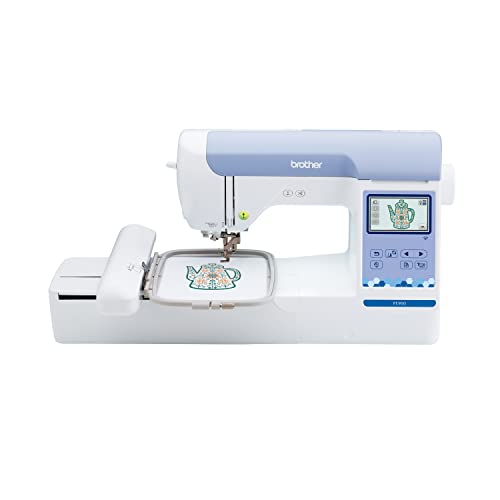
The Brother PE900 suits an embroidery-only small business that wants a bigger field than the usual entry-level machines without moving to a multi-needle unit. Its 5 inch by 7 inch field handles chest logos, larger monograms, and towel designs in one hooping, and the on-screen editing lets an owner resize, rotate, and mirror a design before stitching. Wireless transfer and a USB port cover both phone-based and computer-based workflows. The built-in library is large enough for everyday personalization work, and the jump stitch trimming keeps the reverse side tidy on items where the back is visible.
Specs
- Embroidery field: 5 inch by 7 inch
- Built-in embroidery designs: 193, plus 50 bonus designs through the Artspira app
- Built-in fonts: 13, including 9 English, 3 Japanese, and 1 Cyrillic
- Screen: 3.7 inch LCD touchscreen
- Connectivity: Wireless LAN and USB port
- Design editing: rotate, mirror image, increase and decrease size, preview on the colour display
- Features: jump stitch trim and colour sort, automatic needle threader, on-screen step-by-step tutorials
- Product dimensions: 17.48 x 9.49 x 11.81 inches
- Item weight: 21 pounds
- Manufacturer: Brother International Corp
Best for: embroidery-only shops that need a 5 inch by 7 inch field for logos and personalization.
Watch out for: this is an embroidery-only machine, so sewing work still needs a separate sewing machine.
Brother SE700

The Brother SE700 fits a small business that wants one machine to sew and embroider, rather than two machines taking up the same bench. It combines a sewing machine with more than a hundred built-in stitches and an embroidery unit with 135 designs, so a shop can construct a tote, hem a garment, and then add a monogram without moving the work to another station. The touchscreen shows designs in colour before stitching, and wireless transfer sends files from a computer to the machine. Eight included feet widen the sewing jobs it can take on, from zippers to buttonholes.
Specs
- Built-in embroidery designs: 135
- Built-in embroidery fonts: 10
- Built-in sewing stitches: 103, including 10 styles of one-step auto-size buttonholes
- Hoop area: 4 inch by 4 inch
- Screen: 3.7 inch touchscreen display
- Connectivity: Wireless LAN and USB
- Design transfer: Design Database Transfer software sends embroidery files from a PC to the machine
- Mobile app: Artspira app for drawing and downloading patterns
- Sewing speed: up to 710 stitches per minute
- Features: advanced needle threading system, automatic thread cutter
- Included feet: 8
- Compatibility: Brother iBroidery platform
Best for: small shops that need sewing and embroidery in a single machine for mixed orders.
Watch out for: the 4 inch by 4 inch hoop limits larger designs, so check the largest logo in the order book before choosing it.
Poolin EOC06

The Poolin EOC06 suits owners whose designs are too large for a standard home hoop. Its largest field reaches 11 inches by 7.9 inches, with smaller hoops for 7.9 inch by 7.9 inch and 5.5 inch by 5.5 inch work, so one machine covers jacket backs, tote panels, and small patches. The 7 inch touchscreen is the largest screen in this guide, which makes dragging, resizing, and checking a design easier. Files arrive by USB flash drive or wireless transfer in DST or DSB format, and the digitizing software lets an owner open, view, and edit files rather than relying only on the built-in library.
Specs
- Maximum embroidery area: 11 inch by 7.9 inch
- Included hoop sizes: 11 inch by 7.9 inch, 7.9 inch by 7.9 inch, and 5.5 inch by 5.5 inch
- Screen: 7 inch colour touchscreen
- Built-in designs: 200 patterns, with 8 fonts and 10 languages
- Computer system: InStitch i3, with InStitch Doodle Digitizing Software included
- File transfer: USB flash drive and wireless LAN, in DST or DSB format
- Computerized features: automatic needle threader, bobbin winding, and automatic thread trimming when one colour is completed
- Included supplies: 6 rolls of polyester thread, multicolour pre-wound bobbins, and stabilizers
- Power source: corded electric
- Model number: EOC06
Best for: owners who regularly stitch large designs and want a large touchscreen for editing.
Watch out for: confirm that the digitizing software and file formats match the design files the shop already buys, before relying on them for paid orders.
Smartstitch S-1001

The Smartstitch S-1001 is the production machine in this guide, built for a small business that has moved past one-off personalization into repeat multi-colour orders. Ten needles hold ten colours at once, so a team logo or a detailed crest stitches with automatic colour changes instead of a manual rethread at every step. The 9.5 inch by 14.2 inch field covers large flat work, and the listing names caps, T-shirts, denim, canvas, leather, and vinyl among the materials it can handle. Thread break detection, automatic trimming, and laser positioning reduce the babysitting a long run needs, which matters when one person is also packing orders and answering customers.
Specs
- Needles: 10
- Maximum speed: 1200 stitches per minute
- Embroidery area: 9.5 inch by 14.2 inch
- Screen: 7 inch LCD touchscreen
- Pattern transmission: USB and Wi-Fi, with DST and DSB files from a computer
- Features: automatic thread trimming, automatic colour changing, thread break detection, self-lubrication system, laser embroidery positioning
- Applications: flat work, hats, T-shirts, denim, canvas, leather, vinyl, caps, shoes, and bags
- Included accessories: T-shirt embroidery frames, cap embroidery devices, flat embroidery devices, bobbin winder, toolbox, stand, user manual, and starter kit
- Machine type: commercial embroidery machine in a compact size
Best for: small businesses running repeat multi-colour orders such as team wear and branded workwear.
Watch out for: this is a commercial-format machine, so measure floor space, check the weight and stand requirements, and plan for the learning curve before the first paid run.
Which One Fits Your Situation
You are starting with names, gifts, and small logos
Choose the Brother SE700 if the work also involves sewing, or the Brother PE900 if embroidery is the whole job. The SE700 covers construction and decoration in one machine, while the PE900 gives a larger 5 inch by 7 inch field for the same kind of personalization. Both transfer designs wirelessly or by USB, and both carry a built-in library large enough to answer a gift order the same day it arrives.
Your designs keep outgrowing a standard hoop
Choose the Poolin EOC06, because its 11 inch by 7.9 inch field removes the rehooping that eats time on jacket backs and large panels. The 7 inch touchscreen makes it easier to check placement before committing to a large piece of fabric, and the three hoop sizes mean small work does not have to wait for a second machine. Keep the file formats in mind, and test the transfer workflow with a real customer file first.
You are taking repeat orders in many colours
Choose the Smartstitch S-1001, because ten needles and automatic colour changing turn a multi-colour logo from a long manual session into a run that can be left to stitch while other jobs move forward. The large field and cap and flat attachments widen the products a shop can offer, from hats to workwear. Budget time for setup and training, since a multi-needle machine rewards an owner who learns its threading and tension routine properly.
You want one machine that can do a bit of everything
Choose the Brother SE700 for a mixed home business, since it sews, embroiders, and handles everyday garment work without a second machine on the bench. Its smaller hoop is the trade-off, so it suits owners whose designs stay within 4 inches by 4 inches. If larger embroidery becomes a regular request, add a larger-field machine later rather than forcing every design into the smaller hoop.
Common Mistakes
- Buying the smallest hoop to save space, then splitting every large logo across two hoopings and losing alignment on paid work.
- Ignoring file formats and discovering that the digitizer supplies files the machine cannot read without conversion.
- Choosing a multi-needle machine for occasional single-colour work, and paying for capacity that sits idle while a simpler machine would have done the job.
- Skipping stabilizer and hooping practice, so designs pucker or shift on the first customer garment instead of on test fabric.
- Forgetting to check the weight, footprint, and stand needs of a commercial-format machine before it arrives at a home workshop.
Frequently Asked Questions
What hoop size does a small embroidery business need?
Most small shops start well with a 5 inch by 7 inch field, which covers chest logos, monograms, and towel designs in one hooping. A 4 inch by 4 inch field suits small logos and patches, while fields above 9 inches suit jacket backs and large panels. Measure the largest design in the current order book before deciding.
Can a computerized embroidery machine use my own designs?
Yes, when the machine lists USB or wireless transfer and the file format matches what the digitizer supplies. The machines in this guide name formats such as PES, DST, or DSB on their listings. Check the format on the listing against the files already in use, and test one real file before accepting a paid order in that format.
Is a multi-needle machine better for a small business?
It is better when orders repeat in many colours, because it changes colours automatically and saves rethreading time across a run. For one-off names and single-colour logos, a single-needle machine is simpler, lighter, and easier to learn. Match the needle count to the share of multi-colour work in the order book, not to the size of the machine alone.
Do I need a separate sewing machine as well?
Only if the work includes constructing or altering garments. An embroidery-only machine such as the Brother PE900 stitches designs but does not sew seams, so a shop that makes its own products needs a sewing machine alongside it. A combination machine such as the Brother SE700 sews and embroiders, which suits a mixed home business with limited bench space.
Related guides
More from Amazon
Programs that pair well with the guide above. Offers and eligibility are set by Amazon and may change.
Free shipping on eligible items, Prime Video and more. Eligible new members can start with a free trial.
Start a Prime free trialAudiobooks and podcasts to listen to on the go. Eligible new members can start with a free trial.
Try Audible freeAd-free music streaming. Eligible new subscribers can start with a free trial.
Try Music Unlimited freeA free business account with business pricing and bulk-buying tools for work, shop or home office.
Create a business accountAs an Amazon Associate we earn from qualifying purchases.










Write Your Review
No reviews yet. Be the first to share your experience!