
Key takeaways
- Compare four sewing and embroidery combo machines for a small business, from compact hoops for monograms to wide-field models built for logos.
What's inside
As an Amazon Associate I earn from qualifying purchases. This post may contain affiliate links at no extra cost to you.
A small business that sells personalized goods faces one awkward decision: buy a sewing machine and a separate embroidery machine, or buy one machine that does both. Two machines cost more, take up two workstations and need two sets of supplies. One combo machine saves space and money, but it also means the same machine has to sew garments and stitch logos, and it can only do one of those jobs at a time. The hoop size you choose on day one also locks in the largest design you can stitch, so a machine that looks like a bargain can turn into a limit when a customer asks for a bigger logo.
This guide is for home-based sellers, monogramming services, alterations shops adding personalization, and anyone turning a craft hobby into paid orders. Every machine below is a genuine sewing and embroidery combination model, chosen from the model names and specifications shown on its Amazon listing, so each pick sews ordinary seams as well as stitching embroidery designs.
Quick Picks
As an Amazon Associate we earn from qualifying purchases
| Product | Best for | Key spec from title |
|---|---|---|
| Brother SE700 | Starting a home embroidery side business on a compact footprint | 4 inch by 4 inch hoop area, 135 built-in designs, wireless LAN |
| Brother SE2000 | Left-chest logos, tote bags, and everyday personalized orders | 5 inch by 7 inch hoop area, 193 built-in designs, 241 built-in stitches |
| Janome Horizon Memory Craft 9850 | A sewing-led shop that also embroiders larger pieces | 6.7 inch by 7.9 inch maximum embroidery size, 200 built-in stitches |
| SINGER Legacy SE300 | The widest built-in stitch library with two hoops included | 250 built-in stitches, 200 built-in embroidery designs, LCD touch screen |
How to Choose
Match the hoop to the designs you will actually sell
Hoop size is the hardest limit on a combo machine, because no setting can stretch a design past the field the hoop allows. A 4 inch by 4 inch hoop handles monograms, small chest logos, and patch-sized work, and it keeps the machine compact enough for a small table. A 5 inch by 7 inch hoop covers most left-chest logos, tote bag designs, and baby gifts without forcing you to split artwork. A field near 7 by 8 inches opens up jacket backs and larger decorative panels. Before buying, measure your three best-selling design files and check that each one fits the hoop with a margin, since designs that only just fit are the ones that cause hooping mistakes.
Judge the sewing side as seriously as the embroidery side
A combo machine earns its place in a small business by sewing as well as it embroiders, so the stitch library, buttonhole styles, and sewing speed matter just as much as the design count. Look for enough utility and decorative stitches to finish garments, linings, and hems without reaching for a second machine, plus one-step buttonholes if you make apparel. A machine that sews at 710 stitches per minute will feel different from one rated at 1,000 stitches per minute when a stack of orders is waiting. Also check the work area around the needle, because quilting, bags, and home decor need room to move fabric that a cramped bed cannot provide.
Check how designs get into the machine
A small business lives or dies on how fast a customer file becomes a stitched sample, so the transfer method deserves real attention. Wireless transfer lets you send a design from a computer or phone app without hunting for a cable, and it suits a shop where the machine sits away from the desk. USB transfer is simple and reliable, but it means keeping a drive handy and walking files across the room. Count the built-in designs and lettering fonts too, since a machine with usable built-in monogramming alphabets can take a same-day order without any extra software. Confirm which file formats the machine accepts before you promise a customer their logo.
Plan for the single-machine bottleneck
Every combo machine in this guide has one needle and one work area, which means embroidery occupies the same machine you would otherwise use for sewing. A long embroidery run can block garment construction for an hour, so think about your daily rhythm before you commit. If most orders are embroidery with light sewing, one combo machine copes well. If you sew garments all morning and embroider all afternoon, the switch between modes, including attaching the embroidery unit and changing the foot, becomes part of your working day. Some owners eventually add a second machine, so treat the first combo as the start of a setup rather than the final answer.
The 4 Best Options
Brother SE700

The Brother SE700 is the most approachable way into a sewing and embroidery business, because it keeps the footprint small while still covering the core jobs a new seller takes on. Its 4 inch by 4 inch hoop suits monograms, small logos, and personalized gifts, and wireless transfer means designs can move from a phone or computer without a cable in the way. The touchscreen keeps editing on the machine itself, which helps when a customer wants a name added at short notice. For a home-based seller testing whether embroidery orders will pay, this is the lowest-commitment starting point in this guide.
Specs
- 135 built-in embroidery designs and 10 embroidery lettering fonts
- 103 built-in sewing stitches with 10 styles of one-step auto-size buttonholes
- 4 inch by 4 inch embroidery hoop area
- 3.7 inch LCD color touchscreen display
- Wireless LAN enabled with Artspira app compatibility
- Advanced needle threading system and automatic thread cutter
- Sewing speed up to 710 stitches per minute
- 8 included presser feet
- Product dimensions 16.5 x 7.76 x 12.09 inches, item weight 15.6 pounds
Best for: A new home-based seller taking monogram and small-logo orders without dedicating a whole room to equipment.
Watch out for: The 4 inch by 4 inch hoop rules out larger designs, so confirm your most common logo size fits before ordering.
Brother SE2000

The Brother SE2000 is the step up for sellers whose orders have outgrown a 4 inch hoop but who still want one machine doing both jobs. Its 5 inch by 7 inch field covers the left-chest logos, tote bags, and baby items that make up most personalized orders, and the larger touchscreen makes on-screen editing less fiddly during a busy day. Wireless transfer and the Artspira app keep the workflow phone-friendly, while jump stitch trimming saves cleanup time between designs. This is the pick for a business that already has steady embroidery orders and needs a wider field to say yes more often.
Specs
- 193 built-in embroidery designs plus 50 bonus downloadable designs through the Artspira app
- 241 built-in sewing stitches
- 5 inch by 7 inch embroidery hoop area
- 3.7 inch LCD touchscreen display
- Wireless LAN enabled with Artspira app compatibility
- Color sort and jump stitch trimming
- Advanced needle threading system
- Sewing speed up to 850 stitches per minute and embroidery speed up to 650 stitches per minute
- 13 embroidery lettering fonts
Best for: A growing personalized-goods business stitching left-chest logos, tote bags, and gift orders every day.
Watch out for: Check whether the listing you buy is the machine only or a bundle, since bundles change which hoops and accessories arrive in the box.
Janome Horizon Memory Craft 9850
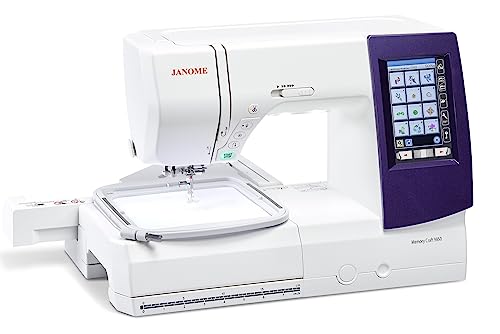
The Janome Horizon Memory Craft 9850 suits a sewing-led business that wants embroidery without giving up a serious sewing machine. Its embroidery field reaches 6.7 by 7.9 inches, the largest in this guide, so bigger designs and wider panels fit without splitting artwork across hoopings. On the sewing side it offers 200 built-in stitches, a fast top sewing speed, and Janome’s AcuFeed Flex fabric feeding system for layered fabrics. Designs move by USB, which is straightforward and dependable. This is the machine for a shop where garment sewing pays the bills and embroidery adds the personal touch.
Specs
- 200 built-in sewing stitches with 6 one-step buttonholes
- 175 built-in embroidery designs
- Maximum embroidery size 6.7 inches by 7.9 inches
- Full-color LCD touchscreen
- USB design transfer
- Maximum sewing speed 1,000 stitches per minute and embroidery speed up to 800 stitches per minute
- Maximum stitch width 9 mm and maximum stitch length 5 mm
- AcuFeed Flex fabric feeding system
- Superior Needle Threader 2 and one-push needle plate conversion
Best for: A sewing-focused shop that needs a wide embroidery field for larger designs and layered fabrics.
Watch out for: The embroidery unit needs clear space beside the machine for the carriage to move, so measure the table before it arrives.
SINGER Legacy SE300

The SINGER Legacy SE300 brings the widest built-in stitch library in this guide, with 250 stitches alongside 200 embroidery designs, which makes it a strong fit for a business that sews varied garments as well as personalizing them. Two embroidery hoops come in the box, so small and larger designs are covered without an immediate accessory order. The LCD touchscreen handles design selection and editing, USB transfer moves customer files onto the machine, and mirror imaging helps position designs exactly where they belong. For a shop that values stitch variety and included hoops over wireless features, this is the practical choice.
Specs
- 250 built-in stitches including basic, stretch, decorative, and buttonhole stitches
- 200 built-in embroidery designs
- LCD touch screen
- USB design transfer
- Two embroidery hoops included
- 10 presser feet included
- One-step buttonhole and mirror imaging
- Product dimensions 20.25 x 8 x 12.25 inches, item weight 20.5 pounds
- Intended for use in the US and Canada at 110 volts
Best for: A small business that wants the broadest stitch range and two hoops in the box from day one.
Watch out for: This is an older model, so confirm the exact listing, included hoops, and seller terms before buying rather than assuming every offer matches.
Which One Fits Your Situation
You are starting a side business from a spare room
Choose the Brother SE700. Its compact footprint fits a small table at home, the 4 inch by 4 inch hoop covers monograms and small logos, and wireless transfer keeps the setup simple. It is the easiest way to find out whether embroidery orders will pay before committing more space and money to a bigger setup.
Your best sellers are left-chest logos and tote bags
Choose the Brother SE2000. The 5 inch by 7 inch field matches the sizes those orders need, the larger touchscreen speeds up editing during long runs, and jump stitch trimming cuts finishing time on every order. It handles the daily volume of a personalized-goods shop without forcing designs to be split or resized.
Sewing pays the bills and embroidery is the added service
Choose the Janome Horizon Memory Craft 9850. Its 200 stitches, fast sewing speed, and fabric feeding system suit garment work and layered fabrics, while the 6.7 by 7.9 inch embroidery field takes on larger designs that the compact combos cannot. One machine covers both sides of the shop, from seams to stitched logos.
You want the most stitches and hoops included on day one
Choose the SINGER Legacy SE300. With 250 built-in stitches, the widest range in this guide, 200 embroidery designs, and two hoops in the box, it covers varied sewing and personalization work without an immediate accessory order. Check the listing details carefully before you buy, since this is the oldest model in this guide.
Common Mistakes
- Buying a hoop smaller than the designs your customers already ask for, then discovering the best-selling logo does not fit.
- Choosing an embroidery-only machine by mistake and finding out later that it cannot sew ordinary seams.
- Forgetting stabilizer, thread, needles, and hooping time when working out whether an order is worth taking.
- Assuming one combo machine can sew garments while it is running a long embroidery design.
- Sending a customer design file to the machine without checking that the format and size are supported.
Frequently Asked Questions
Can one combo machine replace a separate sewing machine and embroidery machine?
For a small business starting out, yes, one combo machine can cover both jobs, since it sews ordinary seams and stitches embroidery designs. The trade-off is that embroidery occupies the machine, so sewing has to wait until the design finishes. Businesses with high volume on both sides eventually add a second machine.
What hoop size do I need for left-chest logos?
Most left-chest logos fit comfortably in a 4 inch by 4 inch hoop, and a 5 inch by 7 inch hoop adds room for wider text and larger artwork. Measure the actual design file, including any lettering, rather than guessing from a photo. If a logo needs more than 5 by 7 inches, look at the wider-field models in this guide.
Do I need extra software to use these machines?
Not for basic orders, since each machine here includes built-in designs and lettering fonts that cover monograms and simple personalization. Extra software becomes useful when you digitize customer logos or edit complex artwork. Check which file formats your machine accepts before buying software, so the two work together.
Can I import my own designs and customer logos?
Yes, all four machines in this guide accept designs from outside the built-in library, by wireless transfer or USB depending on the model. The design must be in a format the machine reads and sized to fit the hoop. Test a customer logo on scrap fabric first, because stitch density and fabric choice change how the finished design looks.
Related guides
More from Amazon
Programs that pair well with the guide above. Offers and eligibility are set by Amazon and may change.
Free shipping on eligible items, Prime Video and more. Eligible new members can start with a free trial.
Start a Prime free trialAudiobooks and podcasts to listen to on the go. Eligible new members can start with a free trial.
Try Audible freeAd-free music streaming. Eligible new subscribers can start with a free trial.
Try Music Unlimited freeA free business account with business pricing and bulk-buying tools for work, shop or home office.
Create a business accountAs an Amazon Associate we earn from qualifying purchases.










Write Your Review
No reviews yet. Be the first to share your experience!