
Key takeaways
- Find embroidery machines that import, edit and stitch your own designs, with wireless transfer, on-screen editing and larger hoops for names and logos.
What's inside
As an Amazon Associate I earn from qualifying purchases. This post may contain affiliate links at no extra cost to you.
A machine for custom designs is not judged by how many built-in patterns it holds. The real decision is whether your own file can reach the machine intact, whether you can resize, rotate, combine and preview it before stitching, and whether the hoop is large enough for the name, logo or layout you have in mind. A machine that only stitches its own library will feel limiting within weeks, even if the first projects look fine.
This guide is for home crafters who want to stitch names and monograms, makers who sell personalised gifts, and sewists who want one machine that also handles ordinary sewing. Every machine below was chosen from the name and specifications on its Amazon listing, with attention to how designs are imported, how they are edited on screen, and how much room the hoop allows.
Quick Picks
As an Amazon Associate we earn from qualifying purchases
| Product | Best for | Key spec from title |
|---|---|---|
| Brother PE900 | Dedicated embroidery with wireless custom design transfer | 5 x 7 inch embroidery field with WLAN |
| Brother SE2000 | Sewing plus embroidery with custom stitch creation | 193 built-in embroidery designs and 241 built-in stitches |
| Brother Innov-is NQ1700E | Large custom layouts and lettering software | 6 x 10 inch field with BES Blue software |
| Brother SE700 | Compact sewing and embroidery for smaller custom work | 4 x 4 inch hoop area with wireless LAN |
How to Choose
How your designs get onto the machine
Start with the transfer route, because it shapes every project that follows. Wireless LAN lets you send a file from a computer with Design Database Transfer software, while a USB port lets you carry a file on a flash drive and load it directly. The Artspira app adds a third route on several Brother models, letting you draw a pattern on a phone and send it to the machine. Check which routes your chosen model actually lists, and confirm that your design source supplies a compatible embroidery file. A machine with several routes is easier to live with than one that depends on a single cable or a single app.
On-screen editing before you stitch
Importing a file is only half the job. The useful machines let you resize, rotate, mirror, reposition, combine and preview a design on a colour touchscreen before the needle moves. That preview matters most for names and logos, where a small change in size or placement can spoil a garment. Larger screens make the work easier, and features such as drag and drop, curved text and colour sorting save time on multi-colour work. If a listing only mentions built-in designs and says nothing about editing, treat it as a machine for ready-made patterns rather than custom work.
Hoop size sets the size of your ideas
The hoop decides the largest design you can stitch in one placement. A 4 x 4 inch field suits patches, small monograms and pocket logos, while a 5 x 7 inch field covers chest logos, towel ends, tote bags and quilt blocks. A 6 x 10 inch field opens up larger names, jacket backs and combined layouts that would otherwise need careful re-hooping. Measure the largest design you expect to stitch, then choose a field with room to spare. Buying a small hoop and hoping to split every large design is a slow way to learn.
Sewing, embroidery only, or both
Some machines embroider only, and they suit people who already own a sewing machine. Others combine sewing and embroidery in one body, which saves space and suits a first machine for a small room. A combination machine should still be judged on its embroidery side: hoop size, design transfer and editing matter more than a long list of sewing stitches if custom embroidery is the goal. Decide which role the machine will play most days, and do not pay for a second function you will rarely use.
The 4 Best Options
Brother PE900
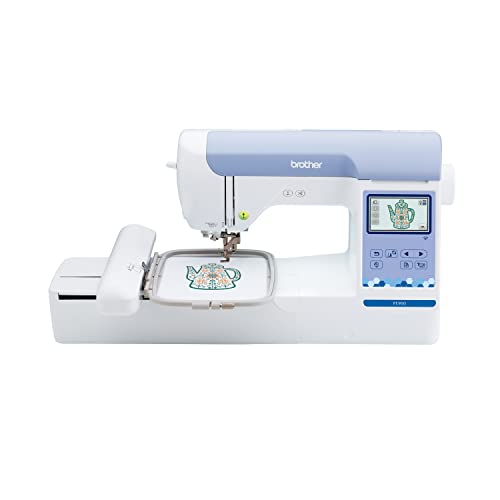
The PE900 is the straightforward pick for someone who already sews on another machine and wants a dedicated embroidery unit built around custom files. Its wireless connection and USB port give you two ways to send a design, and the Artspira app lets you draw a pattern on a phone and transfer it to the machine. On-screen editing covers rotating and mirror imaging, while jump stitch trimming and colour sorting reduce the fiddly cleanup that multi-colour custom work often leaves behind.
Specs
- 5 x 7 inch embroidery field
- 193 built-in embroidery designs
- 13 lettering fonts
- 3.7 inch colour LCD touchscreen
- Wireless LAN and USB connectivity
- Artspira app for drawing and sending custom designs
- Automatic jump stitch trimming
- Advanced Colour Sort for multi-colour designs
- 7.4 inches from needle to arm
Best for: Dedicated embroidery for people who already own a sewing machine and want wireless custom design transfer.
Watch out for: It is embroidery only, so you still need a separate machine for ordinary sewing and garment construction.
Brother SE2000

The SE2000 is the combination pick for custom work that also needs real sewing. It pairs a 5 x 7 inch embroidery field with a full set of sewing stitches, and its wireless connection works with Design Database Transfer software to send embroidery files from a computer. The Artspira app lets you draw your own designs and send them wirelessly, and the My Custom Stitch feature lets you design your own sewing stitches and save them on the machine. The colour touchscreen shows designs and editing options before stitching begins.
Specs
- 5 x 7 inch embroidery field
- 193 built-in embroidery designs
- 241 built-in sewing stitches
- Wireless LAN and USB connectivity
- Artspira app with 50 additional downloadable designs
- My Custom Stitch for designing and saving custom stitches
- Colour LCD touchscreen display
- Design Database Transfer software for sending files from a computer
- Ability to combine designs and change colours on screen
Best for: Makers who want one machine for sewing and for stitching custom embroidery designs.
Watch out for: The Artspira designs require a firmware update and the app download, and a USB drive is required for the firmware update.
Brother Innov-is NQ1700E

The NQ1700E is the pick when custom work keeps outgrowing a small hoop. Its 6 x 10 inch field handles larger names, combined layouts and bigger motifs in a single placement, and the 4.85 inch colour touchscreen supports on-screen editing with resizing, rotating, repositioning, drag and drop and combining designs. It also includes BES Blue lettering software, which adds a large set of fonts and tools for monograms, name drops and applique work, plus wireless transfer and a USB flash drive port.
Specs
- 6 x 10 inch maximum embroidery area
- 258 built-in embroidery designs
- 13 built-in embroidery lettering fonts
- 140 frame pattern combinations
- 4.85 inch colour LCD touchscreen
- Built-in USB flash drive port
- Wireless capability with Design Database Transfer
- BES Blue embroidery software included
- On-screen editing with resizing, rotating, reflecting, tracing and drag and drop
Best for: Larger custom layouts, monograms and lettering projects that need a bigger field and dedicated lettering software.
Watch out for: It is embroidery only, so ordinary sewing needs a separate machine, and the larger field needs more table space and stabiliser.
Brother SE700

The SE700 is the compact combination pick for smaller custom work. Its 4 x 4 inch field suits patches, pocket logos and small monograms, and it still offers the wireless and USB routes found on its larger siblings. You can draw a design in the Artspira app and send it wirelessly, or send files from a computer with Design Database Transfer software. The touchscreen allows on-screen editing, and the sewing side covers everyday seams and buttonholes, so it works well as a first machine in a small space.
Specs
- 4 x 4 inch hoop area
- 135 built-in embroidery designs
- 103 built-in sewing stitches
- 10 built-in embroidery fonts
- 3.7 inch touchscreen display
- Wireless LAN and USB connectivity
- Artspira app for drawing and sending custom designs
- Design Database Transfer software for sending files from a computer
- 10 styles of one-step auto-size buttonholes
- 8 included feet
Best for: Beginners and small-space makers who want sewing plus small custom embroidery in one machine.
Watch out for: The 4 x 4 inch field limits larger names and logos, so check your largest design before choosing it.
Which One Fits Your Situation
You already sew and only need embroidery
Choose the Brother PE900. It is a dedicated embroidery machine with a 5 x 7 inch field, wireless transfer and on-screen editing, without paying for a second sewing function. The Artspira app and USB port cover the two most useful ways to bring a custom file to the machine. It also avoids learning a second sewing interface, since the embroidery workflow stays separate from the machine you already know.
You want one machine for sewing and embroidery
Choose the Brother SE2000. It keeps the same 5 x 7 inch embroidery field as the PE900 and adds 241 sewing stitches, so a small room needs only one machine. My Custom Stitch is a useful bonus when you want to create and save your own stitch patterns. That single-machine setup also keeps thread, stabiliser and accessories in one place, which helps when space is tight.
Your designs keep getting bigger
Choose the Brother Innov-is NQ1700E. Its 6 x 10 inch field and large touchscreen make bigger names and combined layouts practical, and the included BES Blue software strengthens the lettering side. It is the clearest step up when a 5 x 7 inch field starts to feel cramped. The larger touchscreen also makes it easier to check a combined layout before stitching, so placement errors are easier to catch.
You are starting small and short on space
Choose the Brother SE700. Its 4 x 4 inch field, wireless transfer and sewing functions suit patches, small gifts and first custom projects. It is the easiest of the four to fit on a small table, and the most forgiving first step into custom embroidery. Its smaller hoop also means less fabric and stabiliser is used while you practise, so early mistakes cost less.
Common Mistakes
- Buying a machine for its built-in design count and then finding it cannot import your own files easily.
- Choosing a 4 x 4 inch hoop for chest logos and jacket backs that need a larger field.
- Assuming any image file can be stitched, when the machine needs a prepared embroidery file in a compatible format.
- Skipping the on-screen preview and discovering a sizing or placement error only after stitching.
- Forgetting stabiliser, thread and bobbins, which are needed before the first custom design can be stitched well.
Frequently Asked Questions
Can I use my own designs on these machines?
Yes, each machine in this guide lists a route for your own files, through USB, wireless transfer or the Artspira app. The file still needs to be a prepared embroidery file in a format the machine accepts, so check the format before you buy a design or pay for digitising.
Do I need digitising software to stitch a custom design?
Not always. You can buy ready-made embroidery files, use the Artspira app to draw a simple pattern, or use the included BES Blue software on the NQ1700E for lettering. Turning a photograph or a logo into a reliable stitch file is a separate skill, and many makers buy that step from a digitiser.
What hoop size do I need for a name or logo?
A 4 x 4 inch field suits small monograms and pocket logos. A 5 x 7 inch field covers most chest logos, towel ends and tote bags. A 6 x 10 inch field suits larger names and combined layouts. Measure your largest planned design first, then choose a field with room to spare.
Is a combination machine worse at embroidery than a dedicated one?
Not necessarily. The SE2000 and SE700 in this guide share the wireless transfer, Artspira support and on-screen editing of the dedicated models. The main difference is hoop size and sewing ability, so choose by the size of your designs and whether you also need to sew.
Related guides
More from Amazon
Programs that pair well with the guide above. Offers and eligibility are set by Amazon and may change.
Free shipping on eligible items, Prime Video and more. Eligible new members can start with a free trial.
Start a Prime free trialAudiobooks and podcasts to listen to on the go. Eligible new members can start with a free trial.
Try Audible freeAd-free music streaming. Eligible new subscribers can start with a free trial.
Try Music Unlimited freeA free business account with business pricing and bulk-buying tools for work, shop or home office.
Create a business accountAs an Amazon Associate we earn from qualifying purchases.










Write Your Review
No reviews yet. Be the first to share your experience!