
Key takeaways
- Find the best computerized embroidery machine for beginners with touchscreen controls, built-in designs, and wireless design transfer.
What's inside
As an Amazon Associate I earn from qualifying purchases. This post may contain affiliate links at no extra cost to you.
Learning machine embroidery is far easier than it used to be, and the best computerized embroidery machine for beginners is the reason why. A computerized machine gives you a color touchscreen, built-in designs, on-screen editing, and a simple way to move your own designs onto the machine. You pick a design, view it in color, hoop your fabric, and press the button to begin. The machine handles the stitching, the thread changes, and the hoop movement.
That simplicity matters because embroidery has a learning curve of its own: hooping fabric, choosing stabilizer, threading the needle, and placing a design straight all take practice. A beginner-friendly machine removes as many obstacles as possible, so your attention goes to the creative part. This guide explains what to look for, then compares three current Brother models sold on Amazon US. The right choice depends mainly on how large you want to stitch and whether you also want a machine that sews regular seams.
What to Look For in a Computerized Embroidery Machine for Beginners
A computerized embroidery machine is controlled by an onboard computer rather than by mechanical dials alone. That computer drives the touchscreen, stores designs in memory, moves the hoop precisely under the needle, and lets you edit a design before a single stitch is sewn.
Computerized controls and a clear touchscreen
The touchscreen is your control panel. A color LCD touchscreen shows each design in color, lets you tap to select it, and displays stitching progress while the machine works. Look for a screen large enough to read comfortably. On-screen editing is a major advantage: resizing, rotating, mirroring, repositioning, and combining designs directly on the machine means you can adjust a monogram without opening design software on a computer.
Built-in designs and lettering fonts
A generous built-in library lets you begin stitching the day the machine arrives, with no extra purchases and no file hunting. Built-in designs typically include florals, animals, borders, holiday motifs, quilt patterns, and frames, while built-in lettering fonts cover monograms, names, and short phrases. Watch both numbers: the design count tells you how much variety you get out of the box, and the font count tells you how flexible your lettering will be.
USB and wireless design transfer
Sooner or later, you will want designs that did not come with the machine. A USB port lets you load embroidery files from a USB memory stick, which is the simplest method and works without any network setup. Wireless LAN adds a second route: with the manufacturer’s free transfer software, you can send files from a computer to the machine without a cable, and some machines also connect to a companion mobile app for drawing simple patterns or downloading designs. Having both routes is best.
Editing features on the machine
On-screen editing turns a good machine into a flexible one. At a minimum, look for resizing, rotation, mirror imaging, and repositioning. Drag-and-drop positioning, where you move a design around the screen with your fingertip, makes centering a motif on a pocket or a towel far easier than entering numbers. Two automated helpers are also worth noting. Color Sort groups stitching by thread color to reduce thread changes, and automatic jump-stitch trimming cuts the small connecting threads between design elements.
Embroidery field size
The embroidery field is the largest area the machine can stitch in a single hooping. A 4 inch by 4 inch field suits small projects: monograms on towels, patches, baby clothes, small quilt blocks, and ornaments. A 5 inch by 7 inch field more than doubles that stitching area, which opens up larger motifs, jacket backs, tote bags, and pillow covers. If you already own a sewing machine, a dedicated embroidery-only machine with the larger field is often the better choice.
Ease of use and stitching speed
An automatic needle threader pushes the thread through the eye of the needle for you, which removes one of the most fiddly steps in setup. A clearly printed threading diagram on the machine body helps you follow the thread path without opening the manual. Many beginner-friendly machines stitch at up to 650 stitches per minute, and the speed is adjustable, so you can slow the machine down while you learn.
The Best Computerized Embroidery Machines for Beginners
The three machines below are all computerized, all have color touchscreens, built-in designs, and USB or wireless design transfer, and all are current Brother models sold on Amazon US. The PE900 leads for dedicated embroidery with a larger field, the SE700 is the combination pick for someone who also needs to sew, and the PE545 is the compact embroidery-only entry point.
1. Brother PE900 Embroidery Machine with WLAN
- Amazon link: https://www.amazon.com/dp/B0B8337QHR
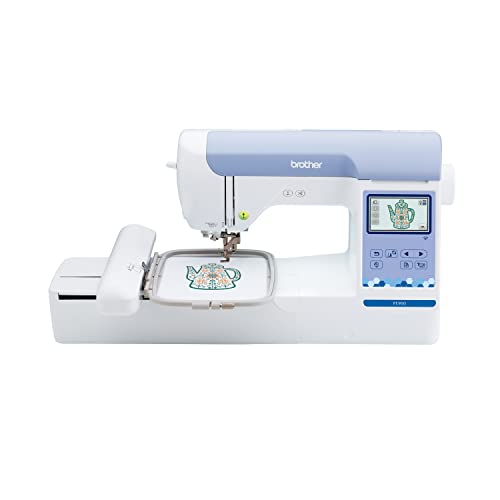
The Brother PE900 is a dedicated embroidery-only machine built around a 5 inch by 7 inch embroidery field, and it is the strongest choice in this guide for a beginner who wants room to grow. Its library holds 193 built-in embroidery designs and 13 built-in lettering fonts, including English, Japanese, and Cyrillic styles. The 3.7 inch color LCD touchscreen shows each design in color before stitching and supports on-screen editing, including resizing, rotation, repositioning, combining designs, and lettering adjustments.
Design transfer is flexible. Wireless LAN lets you send embroidery files from a computer using Brother’s free Design Database Transfer software, and the machine also works with the Artspira mobile app, which provides 50 free designs and lets you draw custom patterns on a compatible mobile device and send them to the machine wirelessly. The PE900 also includes Color Sort, which groups stitching by thread color, and automatic jump-stitch trimming. It stitches at up to 650 stitches per minute and includes an automatic needle threader and a printed threading guide.
It is an embroidery-only machine, so it does not sew standard seams; it sits alongside a sewing machine rather than replacing one.
Who it suits: A beginner who already owns a sewing machine, wants the larger 5 by 7 field, and plans to embroider tote bags, pillow covers, jacket backs, and quilt blocks.
Considerations: It is embroidery-only, so it does not sew seams. It needs a dedicated spot on your table while the embroidery unit is attached.
2. Brother SE700 Sewing and Embroidery Machine

- Amazon link: https://www.amazon.com/dp/B0B8DYP1RN
The Brother SE700 is a computerized combination machine that both sews and embroiders, which makes it the most versatile choice in this guide for a beginner who needs one machine to do everything. On the embroidery side, it includes 135 built-in embroidery designs, 10 built-in embroidery lettering fonts, and a 4 inch by 4 inch embroidery field. On the sewing side, it includes 103 built-in stitches. The 3.7 inch color LCD touchscreen displays designs in color and supports on-screen editing, and wireless LAN lets you transfer embroidery files from a computer using Brother’s transfer software.
The SE700 also connects to the Artspira mobile app for wireless design transfer from a mobile device. Eight presser feet are included. An automatic needle threader and a printed threading diagram simplify setup. Its work area measures 6.4 by 4.0 inches.
Because the SE700 is a combination machine, it asks a beginner to learn two sets of functions: sewing and embroidery. The 4 by 4 field is the main constraint to weigh: it handles monograms, patches, baby clothes, and small quilt blocks comfortably, but larger motifs must be split across multiple hoopings.
Who it suits: A beginner who does not yet own a sewing machine and wants one computerized machine that sews garments and home decor items and also embroiders monograms and small motifs.
Considerations: The embroidery field is 4 by 4 inches, so large designs need to be split across hoopings. Learning both sewing and embroidery functions takes a little more time than learning an embroidery-only machine.
3. Brother PE545 Embroidery Machine
- Amazon link: https://www.amazon.com/dp/B0B8DSJKTH
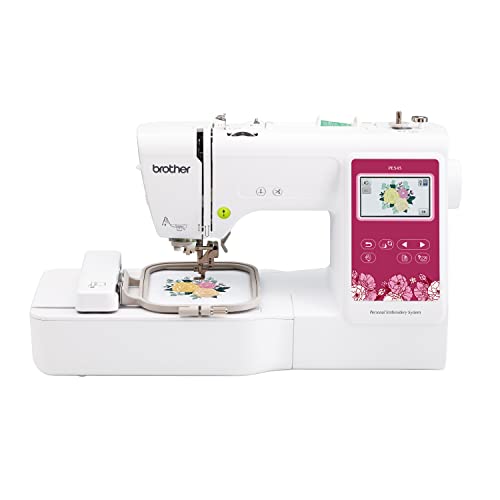
The Brother PE545 is a compact, embroidery-only computerized machine and the most approachable entry point in this guide. It includes 135 built-in embroidery designs, 10 frame patterns, and 10 font styles for lettering and monogramming, all shown in color on a large 3.7 inch LCD touchscreen. The touchscreen supports drag-and-drop positioning, so you can move a design around the screen with your fingertip and adjust it before stitching.
Wireless LAN lets you send embroidery files from a computer using Brother’s free Design Database Transfer software, the Artspira mobile app lets you draw custom patterns on a compatible mobile device or download patterns and send them wirelessly, and a USB port lets you import designs from a USB memory stick into the machine’s built-in memory. The embroidery field measures 4 inches by 4 inches, and the machine stitches at up to 650 stitches per minute. It weighs 14.1 pounds, so it is easy to lift onto a table and store between sessions.
Included accessories cover the basics: bobbins, a cleaning brush, screwdrivers, a dust cover, an embroidery foot, scissors, and a seam ripper. Like the PE900, the PE545 is embroidery-only, so regular sewing still needs a separate machine.
Who it suits: A first-time embroiderer who wants the simplest possible entry point, already owns a sewing machine or does not need one, and plans to stitch small personalized projects such as monogrammed towels, baby clothes, and patches.
Considerations: The embroidery field is 4 by 4 inches, so large designs need to be split. It does not sew standard seams, so it works best alongside a sewing machine.
Comparison Table
| Feature | Brother PE900 | Brother SE700 | Brother PE545 |
|---|---|---|---|
| ASIN | B0B8337QHR | B0B8DYP1RN | B0B8DSJKTH |
| Machine type | Embroidery only | Sewing and embroidery | Embroidery only |
| Embroidery field | 5 x 7 inches | 4 x 4 inches | 4 x 4 inches |
| Built-in designs | 193 | 135 | 135 |
| Lettering fonts | 13 | 10 | 10 |
| Built-in stitches | — | 103 | — |
| Touchscreen | 3.7 in color LCD | 3.7 in color LCD | 3.7 in color LCD |
| Design transfer | Wireless LAN, USB | Wireless LAN, USB | Wireless LAN, USB |
| Artspira app | Yes | Yes | Yes |
| Max speed | 650 stitches per minute | 650 stitches per minute | 650 stitches per minute |
| Needle threader | Automatic | Automatic | Automatic |
Choosing the Right Machine for Your Use Case
Begin with the projects you can picture yourself making. If your list is mostly monogrammed hand towels, baby blankets, patches, and small quilt blocks, a 4 by 4 machine such as the PE545 or the SE700 covers everything, and the choice between them comes down to whether you also need to sew. The SE700 costs you a little learning time in exchange for a full sewing machine built into the same body, which is the better arrangement if you do not already own one.
If your list includes tote bags, pillow covers, denim jackets, and larger quilt blocks, the PE900’s 5 by 7 field is worth choosing. Splitting a large design across two hoopings and lining the halves up by hand is fiddly work that beginners often find difficult, and a larger field avoids it entirely. The PE900 also brings the largest built-in library in this guide, with 193 designs and 13 fonts.
Think about your workspace as well. All three machines need a stable table with room for the embroidery unit to move while stitching, and none of them should be squeezed against a wall on the side where the hoop travels. The PE545 weighs the least of the three at 14.1 pounds, which makes it the easiest to put away between sessions.
Care and Use Tips for Beginners
Good habits in the first month will spare you many tangled threads later. Always use the stabilizer recommended for your fabric: a cut-away stabilizer for stretchy knits, a tear-away stabilizer for stable woven cotton, and a water-soluble topper when stitching on towels or other textured fabrics where stitches can sink into the pile. Hoop the fabric and stabilizer together so the fabric is smooth and taut, like a drum skin, but not stretched out of shape. A fabric that is pulled tight in the hoop will pucker once it is released, so aim for smooth, not strained.
Use embroidery thread and embroidery bobbin thread rather than regular sewing thread, since embroidery thread has the sheen and strength the designs are digitized for. Change the needle regularly. Clean the lint from the bobbin area with the included brush after every few projects, since lint buildup is a common cause of uneven stitching. Keep the machine covered with its dust cover when it is not in use. When a design does not stitch as expected, slow the machine down and check the basics: hooping, stabilizer, needle, and bobbin.
Frequently Asked Questions
Do I need a computer to use a computerized embroidery machine?
No, not for basic use. All three machines in this guide have built-in designs and fonts that you can select, edit, and stitch entirely from the touchscreen, with no computer involved. A computer becomes useful when you want to buy or download additional designs or create your own files. Even then, you can transfer designs with a USB memory stick or wirelessly from a computer or a mobile device.
What is the difference between a computerized embroidery machine and a regular sewing machine?
A regular sewing machine sews seams, hems, and buttonholes by moving fabric under a needle that stays in one place. A computerized embroidery machine moves a hooped piece of fabric under the needle in precise patterns controlled by its onboard computer, stitching a decorative design rather than a seam. A combination machine such as the Brother SE700 does both. An embroidery-only machine such as the PE900 or the PE545 only stitches designs and does not construct garments.
How large a design can a beginner machine stitch?
It depends on the embroidery field. The PE545 and the SE700 stitch designs up to 4 inches by 4 inches in a single hooping, while the PE900 stitches designs up to 5 inches by 7 inches. A design larger than the field can be split into sections and stitched across multiple hoopings, but lining the sections up takes practice.
Can I use my own designs on these machines?
Yes. All three machines accept designs from outside their built-in libraries. You can import embroidery files from a USB memory stick, send files from a computer over wireless LAN using the manufacturer’s free transfer software, or use the Artspira mobile app to draw simple patterns or download designs and send them wirelessly. Designs need to be in a file format the machine can read, so check the format before buying one.
Do computerized embroidery machines need special thread and stabilizer?
Yes. Embroidery thread is made for the high stitch counts and sheen of decorative stitching, and embroidery bobbin thread is lighter than regular bobbin thread so the stitches sit correctly on the fabric. Stabilizer supports the fabric while the machine stitches and prevents puckering and distortion. Stable woven cotton usually needs a tear-away stabilizer, stretchy knits need a cut-away stabilizer, and towels benefit from a water-soluble topper.
Conclusion
The best computerized embroidery machine for beginners is the one that matches the projects you want to make and the equipment you already own. The Brother PE900 is the pick for dedicated embroidery with a larger 5 by 7 field, a 193-design library, and wireless transfer. The Brother SE700 is the pick for a beginner who needs one machine that both sews and embroiders. The Brother PE545 is the pick for the simplest possible entry point, with a friendly touchscreen, built-in tutorial videos, and wireless and USB transfer. Whichever you choose, begin with small projects and use the right stabilizer.
Disclosure: As an Amazon Associate, we earn from qualifying purchases.
Related guides
More from Amazon
Programs that pair well with the guide above. Offers and eligibility are set by Amazon and may change.
Free shipping on eligible items, Prime Video and more. Eligible new members can start with a free trial.
Start a Prime free trialAudiobooks and podcasts to listen to on the go. Eligible new members can start with a free trial.
Try Audible freeAd-free music streaming. Eligible new subscribers can start with a free trial.
Try Music Unlimited freeA free business account with business pricing and bulk-buying tools for work, shop or home office.
Create a business accountAs an Amazon Associate we earn from qualifying purchases.










Write Your Review
No reviews yet. Be the first to share your experience!